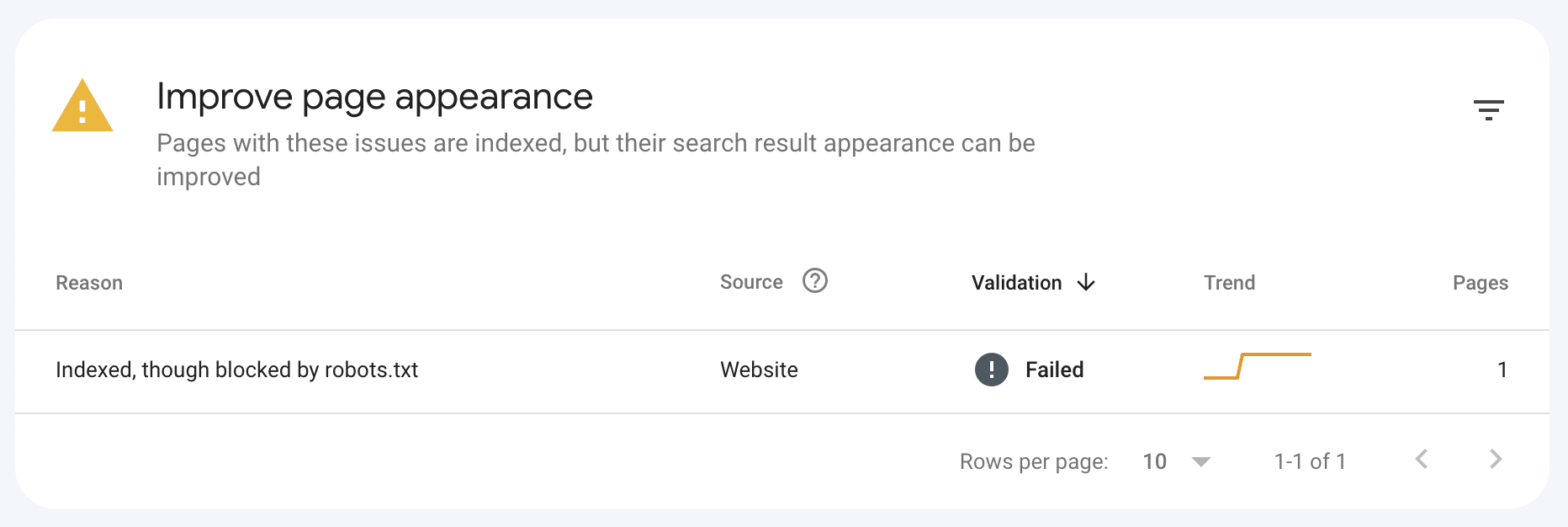
If you’ve encountered the “Indexed, though blocked by robots.txt” message in Google Search Console (GSC), you might be wondering why Google has indexed a page that it can’t crawl. This status means Google has discovered the URL, saw that the robots.txt restricts crawling, but chose to ignore the robots.txt file and proceeded to crawl and index the page.
This article is part of our Google Search Console Indexing Errors series. You may find other articles in the series here:
Google Search Console Page Indexing Errors: How To Fix Them
Alternate Page With Proper Canonical Tag
What Does It Mean?
When a page is “Indexed, though blocked by robots.txt,” it means Google found and indexed the page despite not being able to crawl its content. This could happen because Google discovered the page via internal links, external backlinks, or your sitemap. However, Google cannot fetch the page’s content, which means it won’t be able to display a meaningful snippet or description in the search results.
It’s important to note that robots.txt does not prevent indexing. It simply blocks crawling. To remove a page from search results, you need to use additional measures, such as applying the noindex tag on the page or serving a 404/410 response.
Why Does This Happen?
There are several reasons why this might happen:
- Crawl Blockers: Your robots.txt file might be preventing Google from crawling certain pages, yet those pages might still be indexed because Google discovered them via links.
- Lack of On-Page Directives: Since crawling is blocked, Google can’t detect on-page noindex tags or other directives that would prevent the page from being indexed. This is why it’s crucial to use both robots.txt and noindex for precise control over your pages’ visibility.
How Google Handles Pages Blocked by robots.txt
Googlebot may index pages that are blocked by robots.txt if those pages are deemed significant or valuable. In these cases, Google will show them in search results but without any content or description. This can affect the quality of the snippet and, ultimately, the user’s experience.
Is This a Problem?
The short answer: it depends.
In most cases, this issue is not a major problem. If the pages in question are not valuable or important, and you don’t mind them appearing in search results without a snippet, you can likely ignore the warning.
However, you should act if:
- Important Pages Are Blocked: If the pages being blocked are essential to your site’s SEO (e.g., product pages or high-traffic blog posts), you should resolve the issue to ensure Google can crawl and index them properly.
- Snippets Appear Blank or Unprofessional: If your pages are indexed but appear without a description or snippet, it could lead to a poor user experience and affect your click-through rates.
- Crawl Budget Is Wasted: If Google is crawling and indexing unnecessary pages (like tag pages or low-value content), it might be wasting your crawl budget.
What to Do Next?
1) Identify the Blocked URLs
Start by exporting the list of pages showing the “Indexed, though blocked by robots.txt” status in GSC. Once you have the list, inspect a few of the URLs to determine their importance and decide on the appropriate action.
2) Test the robots.txt Block
Use the robots.txt tester in GSC to check which rule is blocking Googlebot from crawling the page. This tool will help you identify the specific lines in your robots.txt file that are preventing access.
3) Fix the Issue
Once you know which URLs are affected, you can take action. Here’s what you can do depending on the situation:
If you want the page indexed:
- You need to allow crawling by removing the relevant disallow rule from your robots.txt file. Ensure that the page doesn’t have a noindex tag, and consider adding the page to your sitemap if it’s not already there.
If you want to remove the page from Google’s index:
- Temporarily allow Googlebot to crawl the page, add the noindex tag, and then re-block the page after it has been removed from the index. You can also return a 404 or 410 status for pages you no longer want to show up in search results.
- If you don’t want the page in search but are okay with it being indexed:
- If the page should not appear in search results, but you still want to block crawling, you can leave the robots.txt block in place and ignore the “Indexed, though blocked by robots.txt” message. Keep in mind, though, that the page may still appear in search results without any description.
How to Avoid Future Issues
To prevent this issue from happening in the future, consider the following steps:
- Regularly audit your robots.txt file to ensure that you’re not blocking important pages by mistake.
- Use noindex tags when you want to prevent a page from being indexed, but don’t want to block crawling.
- Review internal and external links that could be driving traffic to blocked pages. Reducing unnecessary links or adding rel=”nofollow” tags can help minimize the risk of accidental indexing.
Frequently Asked Questions
Can robots.txt prevent indexing?
No. Robots.txt blocks crawling but does not prevent indexing. Google can still index pages that are linked to, even if they are blocked from crawling.
Why does my page appear with no description in search results?
This typically happens because Google can’t crawl the page due to the robots.txt block. Since Google can’t fetch the content, it can’t create a proper snippet.
Should I ignore the “Indexed, though blocked by robots.txt” status?
If the blocked pages are not valuable or critical to your site’s SEO strategy, it’s fine to ignore the warning. However, for important pages, it’s best to resolve the issue to ensure they are properly indexed and crawlable.
How can I remove an indexed page that’s blocked by robots.txt?
To remove a page, you need to temporarily allow crawling, add a noindex tag, and then re-block the page in your robots.txt after it has been removed from the index.
Conclusion
The “Indexed, though blocked by robots.txt” status in Google Search Console can be a helpful reminder to review your crawling and indexing strategies. While it’s usually not a critical issue, it’s important to address it when valuable content is blocked from being indexed properly. Whether you want to index, deindex, or simply block a page, understanding how to manage your robots.txt file and indexing preferences will help you avoid unnecessary problems and maintain control over your site’s visibility in search.
At First Page Digital, we are a leading SEO agency with extensive experience analysing and resolving GSC page indexing issues. If you need expert assistance to look into your GSC account, feel free to reach out to our team for professional support.