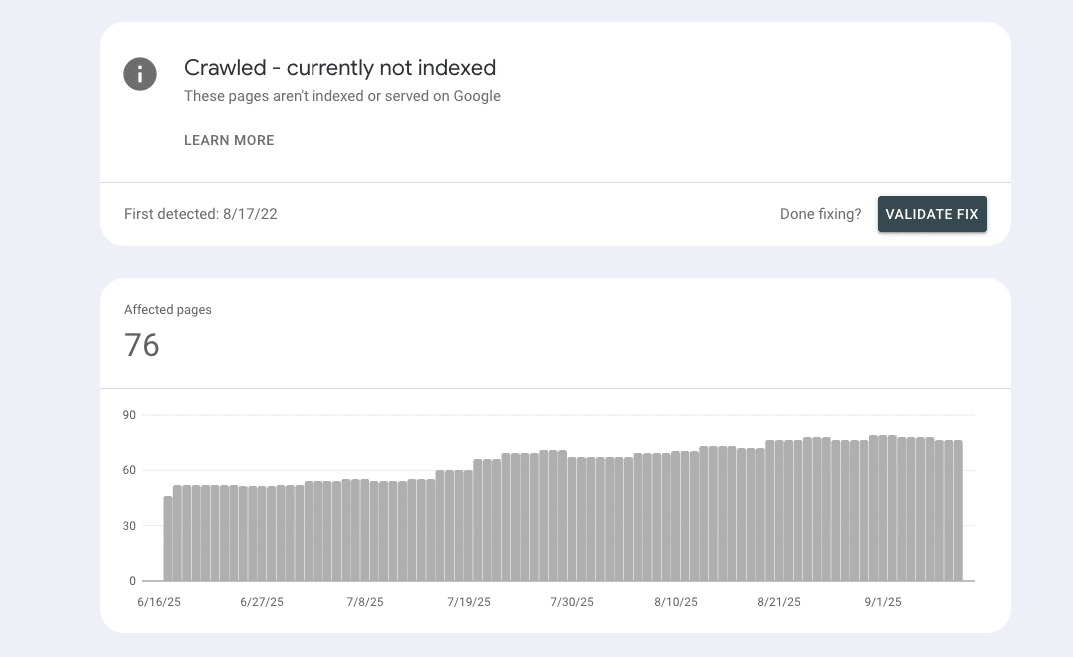
Seeing “Crawled – currently not indexed” in GSC doesn’t mean your site is broken. It means Google visited the URL but decided not to add it to the index, a selection call, not an error.
Summary of steps to take to address “crawled – currently not indexed”:
- Verify reality with URL Inspection. Test live URL to see crawl, index, and rendered HTML.
- Fix blockers: unintended noindex, robots disallows, 4xx/5xx, or rendering issues (JS-only content that renders blank).
- Upgrade value: unique, intent-matched content.
- Strengthen internal links (add from menu, footer, homepage, and relevant pages).
- Re-request indexing, then give it time, especially for new or low-signal sites. Google can take days (or more); you can’t force indexing.
This article is part of our Google Search Console Indexing Errors series. You may find other articles in the series here:
Google Search Console Page Indexing Errors: How To Fix Them
Alternate Page With Proper Canonical Tag
Indexed thought blocked by robots.txt
What the status means
When you see “Crawled – currently not indexed” in the Page indexing report of Google Search Console, it means Google fetched the URL but chose not to add it to the index.
This is not a site-breaking error. Google’s own docs stress that “Not indexed” isn’t necessarily bad and you shouldn’t expect 100% coverage, only your canonical, important pages need to be indexed. The report also reminds you to use the URL Inspection tool for page-level checks if you need fresher, URL-specific detail.
Why do so many sites notice this status in 2024–2025? Put simply, Google has become more selective. The web is flooded with overlapping and auto-generated content, and Google is investing fewer resources in processing pages that don’t add clear, original value. Industry explanations tied to recent changes, like the roll-in of “helpful content” concepts alongside the March 2024 core update, frame this as Google raising the bar for what’s worth indexing. The practical takeaway: if a page is thin, duplicative, or weakly connected in your site architecture, it’s more likely to be crawled but set aside.
How to think about it: treat “Crawled – currently not indexed” as a selection signal. First ask, does this page truly deserve to be in Google for my audience? If the answer is no, that’s fine, use noindex and move on. If yes, you’ll improve your odds by fixing any blockers, strengthening internal links (so Google can understand importance), and upgrading the page’s unique value. The status may change over time as Google revisits the URL, but there’s no need to “force” crawling from the report itself; focus on making the page index-worthy.
First principle: You don’t want everything indexed
Indexing is not a participation trophy. Aim to have only pages that help searchers in Google; everything else should be discoverable to users on-site, but excluded from Search. Typical candidates to exclude include thin utilities (cart, login, account, thank-you), faceted filters and parameterized variants (endless combinations of the same list), duplicative archives (tag/date archives mirroring categories), internal search results, and feeds. Control this with noindex (via <meta name=”robots” content=”noindex”> or the X-Robots-Tag header).
Two critical implementation notes from Google:
- Allow crawling so Googlebot can see your noindex; if you block a page in robots.txt, Google may still show the URL without content. Use noindex to remove it from results.
- Use rel=”canonical” to consolidate true duplicates (for example, print/PDF or parameter variants) so signals accrue to one representative URL.
Why this helps quality: fewer weak URLs = clearer signals. Google advises that exposing lots of URLs you don’t actually want crawled or indexed can negatively affect crawling and indexing. Pruning/noindexing noise and deduping variants keeps your XML sitemaps and internal links focused on the pages that matter, which helps Google understand site structure and importance.
Practical checklist: (1) map templates you never want in Search and add noindex; (2) canonicalize or merge duplicates; (3) keep parameter/filter pages out of the index (noindex, or discourage crawling of noisy patterns); (4) link prominently to priority pages (nav, footer, homepage, contextual hubs) to concentrate internal signals.
Confirm the reality (and avoid false alarms)
Start with URL Inspection, it’s the most current view for a single page. Paste the URL into Search Console, click Test live URL, then open View tested page → HTML to check what Google actually rendered (not just the raw source). If key content isn’t in the rendered HTML, you’ve found your culprit.
Remember that the Page indexing report is great for site-level coverage, but it isn’t real-time. Many Search Console reports update in batch cycles (often every few days), so they can lag behind what a live test shows. If the report and Inspection disagree, trust the live test for that specific URL, then recheck the report later.
For a quick external sense-check, use a precise site: query in Google Search. Example:
- site:https://www.example.com/your-page (exact URL)
- Or pair the prefix with a unique phrase from the page title in quotes.
This won’t be perfect—Google’s own guidance says search operators have indexing/retrieval limits, so URL Inspection is more reliable for debugging—but a targeted site: can help spot obvious mismatches.
Practical flow:
- Inspect → Test live URL and review Rendered HTML + HTTP status/robots/indexing signals. Fix anything broken or missing.
- If you need to request a recrawl, do it from URL Inspection (keep in mind quotas and that repeated requests won’t speed it up).
- Use the Page indexing report to monitor trends over time, knowing it can lag; don’t overreact to day-to-day swings.
Bottom line: prove reality with the live test, then let the reports catch up. This keeps you from chasing phantom problems and focuses your effort where it actually moves the needle.
Why “Crawled – Currently Not Indexed” Happens
1) Low value / thin or near-duplicate content
How to detect: Pages that repeat listings, scrape manufacturer blurbs, or lightly remix existing posts often get crawled but set aside. Check if the rendered page actually adds anything unique (original copy, data, imagery, opinions). If the primary content is boilerplate or near-duplicate of another URL, you’ve found a likely cause.
How to fix: Raise depth, uniqueness, and intent match: add original insights, media, FAQs, and concrete answers that competitors lack. Consolidate overlapping pages and redirect to a stronger canonical. Avoid publishing thin tag/date archives where a category or pillar already exists.
2) Site-wide quality/selectivity
How to detect: If many URLs are excluded, you may have a site-level quality signal problem: weak templates, lots of near-duplicates, or noise (feeds, infinite filters). Look for whole sections with low value or overlap.
How to fix: Improve information architecture (clear categories, fewer dead-end pages), prune or noindex low-value templates, and strengthen E-E-A-T signals on pages that matter (author info, sources, experience). Consolidate overlapping content into best-in-class hubs.
3) Weak internal linking / unclear hierarchy
How to detect: Orphaned pages, deep click-depth, or nav that doesn’t link to your money pages. Crawl your site and list pages with zero or few inbound internal links.
How to fix: Make links crawlable <a href>, use descriptive anchors, and add links from menu, footer, homepage, plus contextual links from related hubs. This helps Google discover and understand importance.
4) Technical blockers
How to detect: In URL Inspection → Test live URL → View tested page, look for unintended noindex, robots.txt disallows, 4xx/5xx, or canonical pointing at a non-indexable page. If Google can’t fetch or is told not to index, it won’t.
How to fix:
- Remove stray noindex/x-robots-tag on pages you want indexed. Use noindex (not robots.txt) to exclude pages so Google can see the directive.
- Serve correct HTTP codes (200 for real pages; 404/410 for gone content; fix 5xx).
- Ensure canonicals point to a live, indexable target (not blocked/noindexed).
5) JavaScript rendering pitfalls
How to detect: If your main content is client-rendered, Google might see a near-blank DOM (script errors, blocked resources, or timeouts). In URL Inspection’s Rendered HTML, confirm that the real content exists; check console messages for errors.
How to fix: Prefer SSR/SSG or hydration for critical content; treat dynamic rendering as a legacy workaround, not a long-term fix. Audit with Google’s JS troubleshooting guide and ensure required resources aren’t blocked.
6) Canonicalization / parameter noise
How to detect: Multiple URLs show the same content (filters, sort parameters, print views), and Google chooses a different canonical than yours or flips between variants.
How to fix: Use self-referencing canonicals on preferred URLs, ensure canonical targets are indexable and internally linked, and simplify/standardize URL parameters to reduce duplicate variants.
7) New websites or unknown publishers
How to detect: Fresh domains and new sections commonly see “crawled, not indexed.” There’s nothing “broken”; indexing can take days to weeks and isn’t guaranteed, especially with low link signals.
How to fix: Strengthen internal links to priority pages, earn a few trusted mentions/backlinks, keep sitemaps clean, and keep publishing genuinely useful content. Re-request indexing after material improvements, then give it time.
8) Reporting quirks / delays
How to detect: Coverage reports can lag and sometimes disagree with what you see live. If a page looks indexed in search or URL Inspection shows a different status, it’s likely timing.
How to fix: Treat URL Inspection (live test) as the source of truth for a single URL and use the Page indexing report for trending, not minute-by-minute truth. Recheck after a few days before making big decisions.
9) Macro/system factors (covered next)
How to detect: Industry-wide chatter plus an official note on the Search Status Dashboard typically indicates a temporary indexing slowdown or incident. Your site didn’t suddenly get “bad”; the system is throttled.
How to fix: Don’t thrash changes. Validate with URL Inspection, queue key URLs for re-crawl, and watch the dashboard until Google announces “fixed.” (We’ll expand on this in the next section.)
Macro/system factors you can’t control
Incidents & bugs. Sometimes Google has a temporary indexing outage that slows or stalls fresh content for hours (occasionally longer). When this happens, even the biggest publishers go missing from “Past hour” results. Google typically posts to the Search Status Dashboard and the trade press confirms when it’s resolved. Action: don’t thrash your site. Validate a few key URLs with URL Inspection → Test live URL, queue a Request indexing after you’ve verified nothing’s broken on your end, and recheck later. These events are rare, but real.
Industry-observed crawl dips. Beyond formal incidents, SEOs sometimes spot global crawl slowdowns that later revert. In Aug 2025, multiple platforms reported steep drops in Googlebot activity; Vercel’s CTO estimated a ~30% global crawl-rate drop, with some large sites dipping to near-zero before recovering once Google fixed the underlying issue. If your Crawl Stats graph tanks while rankings stay steady, you may be seeing a system blip rather than a site problem. Action: monitor Crawl Stats and server logs, keep publishing, and avoid knee-jerk changes.
Core updates & experiments aren’t crawl switches. It’s tempting to read every crawl spike/dip as “we got hit by the update.” Don’t. Google has reiterated that crawling/indexing systems are independent of ranking/core updates, so a noisy crawl graph isn’t proof of an algorithm hit. Action: during volatile periods, focus on fundamentals: fix technical blockers, keep canonicalization clean, strengthen internal links, and ship genuinely useful content. Evaluate rankings/traffic with a wider window, not just crawl graphs.
Bottom line: some slowdowns are on Google’s side, not yours. Use URL Inspection to confirm page-level reality, keep your improvement list moving, and let the system catch up rather than “solutioning” a transient platform issue.
Fixes that move the needle
Below is the playbook we use on real sites. Work top-down: make the page worth indexing, make it easy to find/understand, then ask Google to re-crawl.
A) Content upgrades (depth, originality, intent)
Why it matters: “Crawled – currently not indexed” often reflects a selection choice when the page adds little beyond what’s already in the index. Elevate uniqueness, demonstrate experience, and answer the search intent completely.
Checklist
- Add sections that competitors don’t have: original data, examples, screenshots, templates, FAQs.
- Tighten topical focus (one primary intent per URL) and trim fluff.
- Merge/redirect near-duplicates into one best page; keep only the strongest version indexed.
B) Internal links (tactical, not theoretical)
Why it matters: Links help Google discover pages and infer importance. Make sure your priority URLs are linked where it counts.
Checklist
- Add links from the menu, footer, and homepage to top money pages (no JS-only nav; use crawlable <a href>).
- Add contextual links from related category/pillar pages; use descriptive anchor text (avoid “click here”).
- Fix orphans (pages with zero internal inlinks) and reduce click depth to ≤3 where feasible.
C) Information architecture (IA)
Why it matters: Clear categories → clearer signals. A sane IA also improves sitelinks and navigation clarity. Use breadcrumbs to express hierarchy and help users (and Google) understand context.
Checklist
- Map categories → subcategories → detail pages; avoid overlapping hubs.
- Implement breadcrumbs (and BreadcrumbList structured data) across templates.
- Keep paths flat-ish for key pages; don’t bury important URLs five clicks deep.
D) Canonicalization & duplication cleanup
Why it matters: Duplicate/parameter variants split signals. Tell Google the one URL you want, and ensure the target is actually indexable.
Checklist
- Use rel=”canonical” on duplicates to point at the preferred URL; keep self-canonicals on indexable pages.
- Don’t canonicalize to a non-indexable page (blocked/noindexed/404/5xx) and don’t mix noindex with canonicals on the same cluster.
- Tame parameters: standardize sort/filter URLs; ensure only the canonical variant is linked internally.
E) Technical hygiene (indexability & responses)
Why it matters: If Google is told not to index—or hits errors—it won’t index. Validate on the live fetch, then fix.
Checklist
- Remove unintended noindex (meta or X-Robots-Tag) from pages you want indexed. Use noindex (not robots.txt) for pages you don’t want in Search so Google can see the directive.
- Serve the right HTTP codes: 200 for live pages; 404/410 for gone content; fix 5xx at the source.
- If you changed indexability or fixed errors, Request indexing from URL Inspection after a live test passes.
F) Rendering (so Google doesn’t see a blank page)
Why it matters: If the main content is client-rendered and scripts error or time out, Googlebot’s rendered HTML can be nearly empty—so the page looks thin and isn’t indexed. Prefer architectures that ship critical content in HTML.
Checklist
- In URL Inspection → Test live URL → View tested page → HTML, confirm your core content is present; check console messages.
- If content is JS-only, consider SSR/SSG or hydration so critical content arrives in the initial HTML. Google treats dynamic rendering as a short-term workaround, not a long-term fix.
- Ensure required resources (JS/CSS/API endpoints) aren’t blocked by robots or CORS; keep render time reasonable.
G) Sitemaps & discovery
Why it matters: Sitemaps are hints, not guarantees—but clean sitemaps improve discovery and reinforce your preferred canonicals. Include only URLs you want indexed.
Checklist
- Keep XML sitemaps current and noise-free (no redirects, 404s, or parameter junk).
- List canonical URLs (your preferred versions) and avoid duplicate variants across sitemap files.
- Use a sitemap index for scale; monitor processing in the Sitemaps report.
How Long Will This Take?
After you’ve improved a page, prove reality once with URL Inspection → Test live URL. If the live test looks clean (200 status, indexable, content visible in Rendered HTML), resist the urge to spam requests. Use Request indexing once. Submitting repeatedly doesn’t speed things up and the tool has a quota.
How long to wait? Google’s systems don’t index on a fixed clock. Crawling and indexing take time and depend on many factors, and Google can’t guarantee when or if a specific URL will be indexed. In practice, allow several days for discovery and reprocessing before you reassess; many Search Console reports also update in batches (commonly every 3–4 days), so the Coverage view can lag behind page reality.
New or low-signal sites (few links/mentions, weak internal links) often take longer. That’s normal, Google emphasizes that crawling/indexing rely on multiple signals, and there are no guarantees even if you follow best practices. Keep strengthening internal links, sitemaps, and unique value while you wait.
Recheck cadence:
- Day 0: Fix → Test live URL → Request indexing.
- Day 3–7: Recheck with a fresh URL Inspection and a targeted site: search, keeping in mind report lag.
- Week 2+: If still excluded and you’ve materially improved content/links, repeat the cycle once, don’t hammer the button. Google doesn’t guarantee inclusion, only consideration.
Bottom line: ship real improvements, verify once, then give it time—requesting a crawl never guarantees indexing.
Advanced playbook (optional)
- Server-log sampling (to verify crawl reality)
Don’t guess—measure. Pull 7–14 days of access logs and isolate Google crawlers by verifying them (reverse DNS → *.googlebot.com/*.google.com, then forward-confirm). Slice by path to see which sections get hits, response codes, and latency spikes. Correlate with Crawl Stats (requests/day, response types, host status) to spot server bottlenecks or sections Google is ignoring. If key templates show few/zero verified Googlebot hits while others are healthy, you have a discovery/priority issue (often internal links or duplication). - Render diagnostics (so Google sees real content)
Use URL Inspection → Test live URL → View tested page → HTML to confirm your rendered HTML contains the primary content. Check the “More info” panels for blocked resources and use DevTools to reproduce console errors (hydrate mismatches, timeouts). If your main content is client-rendered, mitigate by shipping critical content in the initial HTML via SSR/SSG (and hydrate progressively), so Googlebot never receives an empty DOM. Treat dynamic rendering as a stopgap, not strategy. Re-test after fixes and only then request indexing. - Quality pruning (systematic, not ad-hoc)
Indexation improves when you reduce noise. Run a template-level audit and apply noindex to thin/duplicative URLs (e.g., tag/date archives, internal search, faceted variants, orphaned thank-you pages). Keep the canonical set tight: consolidate near-duplicates and ensure the canonical target is indexable and well-linked. If you’re on WordPress, configure this at scale (archives/taxonomies) and maintain a clean sitemap that lists only canonical URLs you actually want indexed. Re-crawl priority sections after each pruning wave.
What “good” looks like
- Logs show verified Googlebot hitting your priority templates daily, with 200s, stable latency, and rising hits after internal-link and rendering fixes.
- URL Inspection rendered HTML mirrors what users see (no missing body copy), and blocked resources are resolved.
- The indexable set is lean (noise moved to noindex), canonicals are consistent, and the sitemap reflects only your preferred URLs.
Use this loop quarterly: sample logs → fix render & indexability → prune/merge → strengthen links → resubmit. It compounds over time, and turns “crawled, not indexed” into a shrinking edge case rather than a chronic symptom.
Escalation options: third-party indexing helpers
IndexNow (push protocol). If you’ve fixed quality/technical issues and still need faster discovery (not guaranteed indexing), consider IndexNow. It lets you push URL changes (add/update/delete) to participating engines—currently Bing, Yandex, Naver, Seznam—so they can fetch sooner.
How it works (quickly): generate and host a verification key, then ping the IndexNow endpoint with one or many URLs whenever content changes (CMS/host integrations exist). Treat this as a speed-up hint, not a promise. As of mid-2025, Google hasn’t adopted IndexNow; they continue to rely on traditional crawling and their own APIs.
When to use it: high-change sites (news, classifieds, inventory, jobs), or any setup where getting crawled sooner has business value. Microsoft/Bing’s guidance outlines scenarios and best practices; several platforms (e.g., WordPress plugins, some CDNs/hosts) can automate pings.
OmegaIndexer (and similar services). Tools like OmegaIndexer aim to accelerate discovery by submitting URLs via a blend of methods (pings, feeds, API hooks where available). Real-world results are mixed: some reviews report quick appearance in search results; others find benefits inconsistent. Use sparingly, after core fixes, and monitor outcomes at a small scale before rolling out. No third-party service can guarantee Google indexing.
Reality check: Google’s Indexing API ≠ general indexing. Google’s Indexing API is intentionally limited: it’s designed for JobPosting and Livestream (BroadcastEvent in a VideoObject) pages to keep short-lived content fresh. It’s not a general-purpose “index my page” API—don’t attempt to use it for ordinary blog/product pages.
At First Page Digital, we are a leading SEO agency with extensive experience analysing and resolving GSC page indexing issues. If you need expert assistance to look into your GSC account, feel free to reach out to our team for professional support.