Squarespace is popular, and for good reason: it is fast to build on, polished by default, and handles a number of technical SEO requirements automatically. But whether it is good enough for SEO depends entirely on what you are trying to achieve. This guide covers the platform’s real capabilities, the limitations that matter, and a step-by-step workflow for getting the most out of Squarespace’s SEO tools. It is written for small to mid-sized business owners, creators, and marketers who are using or seriously evaluating Squarespace and want an honest, experience-based assessment rather than a platform sales pitch.
Is Squarespace Good for SEO?
The short answer: yes, for small to mid-sized sites where design quality and ease of use are priorities. No, if your goals include complex schema automation, multilingual SEO with systematic hreflang, bulk metadata management across large content archives, or technical configurations that go beyond what Squarespace’s admin interface exposes.
Historical Perspective
Squarespace’s SEO capability has improved meaningfully over the past several years. Practitioners who dismissed it a few years ago now acknowledge that the platform covers many technical fundamentals that once required manual developer intervention: HTTPS, mobile responsiveness, XML sitemaps, and basic structured markup are all handled at the infrastructure level. The question has shifted from “can Squarespace rank?” to “can Squarespace compete in the SERPs you need to be in?”
Independent Analysis from a Large Dataset
SEOSpace’s review of over 21,000 live Squarespace sites provides the most data-grounded view of how the platform actually performs in practice. The patterns are consistent: sites that underperform tend to share the same issues: heavy, uncompressed images dragging down Core Web Vitals, accidental multiple H1 headings caused by design-level styling decisions, and broken or orphaned internal links. Sites that rank well tend to have lean images, clean single-H1 structure, original content, and disciplined internal linking. The platform does not determine the outcome as much as the execution does.
Expert Take
The practitioner consensus is pragmatic: Squarespace can compete for most informational and local search queries when paired with best-practice SEO execution. The ceiling appears when sites require complex structured data beyond what Squarespace auto-generates, large international content catalogs with systematic hreflang requirements, or heavy custom logic at the template or URL level.
Working with Squarespace clients in Singapore, the most common issues we encounter during SEO audits are consistent with the data: uncompressed images causing slow Core Web Vitals, heading structure problems from design choices (particularly accidental multiple H1s), and the absence of structured data for content types that would benefit from rich results. These are addressable, but they require discipline, and some constraints (like the absence of bulk metadata editing) impose a real operational cost at scale.
Squarespace SEO Features Overview
Squarespace divides its SEO capabilities into two categories: things the platform handles automatically, and things that require deliberate action from you. Understanding this division helps set realistic expectations before you invest in the platform.
| Squarespace Handles Automatically | Requires Your Input |
| Mobile responsive design | Meta titles and descriptions (per page) |
| HTTPS / SSL certificate | On-page copy and content quality |
| XML sitemap generation | Heading hierarchy (H1, H2, H3: requires editorial discipline) |
| Basic structured markup in many templates | Image alt text |
| Clean URL structure | Internal links and anchor text |
| Image compression options | Custom schema injection (via code blocks) |
| Canonical tag defaults | URL slugs (Squarespace auto-generates from page titles; these should always be reviewed) |
| Google Search Console integration | Analytics configuration and conversion tracking |
Squarespace’s own SEO documentation and Help Center are worth bookmarking as a reference. They are well-maintained and cover the admin paths for each of the user-controlled items above in detail.
What FPD’s Experience and the Data Show
When we audit Squarespace sites for Singapore-based clients, three issues appear consistently and almost regardless of industry or site size. First, image weight is by far the most common performance problem: images uploaded at full resolution without pre-compression create slow LCP times that hurt both Core Web Vitals scores and user experience. Second, heading structure is frequently incorrect, often because Squarespace’s design controls allow styled text to visually resemble an H1 without being one in the HTML, resulting in either missing H1s or multiple H1s on the same page. Third, internal linking is typically sparse or unplanned, with many pages effectively orphaned from the rest of the site’s linking structure.
These findings align closely with what SEOSpace documented across their review of 21,327 live Squarespace sites. The same three failure modes appear at scale. What the SEOSpace data also confirms is that the platform itself is not the determining factor for ranking success: the sites in their dataset that perform well share disciplined SEO execution, not a different version of Squarespace.
Squarespace has addressed many of the technical gaps practitioners flagged in earlier platform versions, though heading structure control and the absence of bulk metadata tools remain ongoing friction points for larger sites.
FPD works with clients across multiple CMS platforms. The operational constraints of Squarespace become most apparent not in the first hundred pages but in the second and third hundred, where the absence of bulk editing tools and the limits on robots.txt and sitemap customisation start to compound. For more on how Squarespace compares to WordPress and other platforms in a full CMS evaluation, see the final section of this guide.
How to Optimise Your Squarespace Website for SEO
The following ten steps cover the complete Squarespace SEO workflow, from initial configuration through to ongoing monitoring. Each step includes the specific Squarespace panel path or field name where relevant.
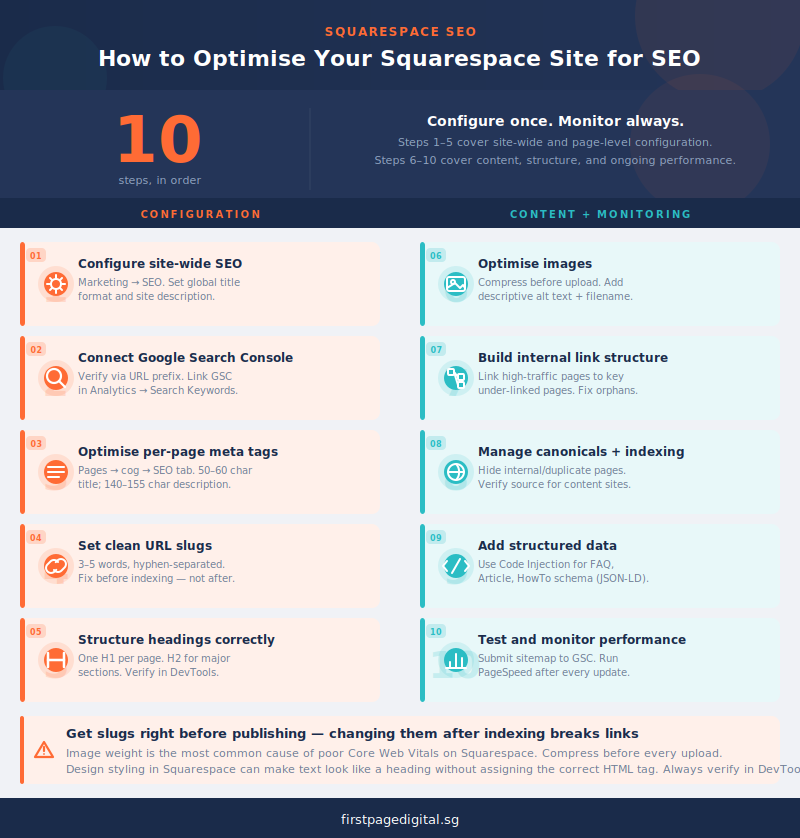
- Configure site-wide SEO settings. Navigate to Marketing → SEO in your dashboard. Set a global title format that appends your brand name to page titles (e.g. “Page Title | Brand Name”). Write a site description that accurately describes the site’s purpose and primary keywords. This is used as a fallback meta description where page-level descriptions are missing. Confirm SSL is active (it should be by default) and that the site is set to be indexed by search engines.
- Connect Google Search Console. Verify your site using the URL prefix method in GSC. Link your GSC property through Squarespace → Analytics → Search Keywords to surface keyword data inside your dashboard. Once connected, check the Coverage report for indexing errors and the Performance report for keyword and click data at least once a week during active SEO work.
- Optimise per-page meta titles and descriptions. For each page, navigate to Pages → page settings (the cog icon) → SEO tab. Write a unique meta title for every page (50 to 60 characters, primary keyword near the front). Write a unique meta description (140 to 155 characters) that accurately describes the page content and is written to generate clicks, not just to describe. Squarespace uses the page title as the fallback meta title and the site description as the fallback meta description; both are poor substitutes for page-specific copy.
- Set clean, keyword-relevant URL slugs. Navigate to Pages → page settings → General tab. Squarespace auto-generates slugs from page titles. These are often long and include stop words that add no SEO value. Review every slug and shorten it to the core keyword phrase: lowercase, hyphen-separated, three to five words maximum. Once a page is indexed, changing the slug creates a broken link unless a redirect is configured. Prioritise getting slugs right before publishing.
- Structure headings correctly. Use exactly one H1 per page. On most Squarespace templates the page title becomes the H1, so check that no additional H1s have been applied elsewhere. Use H2 for major sections and H3 for sub-sections within those sections. The heading structure is the map Google uses to understand what a page is about and how it is organised. Check pages in your browser’s developer tools or a free SEO Chrome extension to confirm the actual heading tags. Design styling in Squarespace can make text look like a heading without assigning the correct HTML tag.
- Optimise images before and after upload. Compress all images before uploading. Tools like TinyPNG or Squoosh reduce file sizes without visible quality loss. Use descriptive filenames (e.g. “singapore-office-interior.jpg” rather than “IMG_4432.jpg”). Add descriptive alt text for every image: describe the image content accurately and include the page’s target keyword where it fits naturally. Enable Squarespace’s built-in image compression settings where available. Image weight is the most common cause of poor Core Web Vitals scores on Squarespace sites, and it is entirely within your control.
- Build a deliberate internal linking structure. Internal links distribute authority across the site and help Google discover and evaluate all your pages. Add contextual links from high-traffic pages to important but less-visited pages using descriptive anchor text. In the Pages panel, check the “Not Linked” section and audit any pages listed there. Either add links to them from relevant content, or to them from relevant content, or disable them if they serve no SEO or user purpose. Orphaned pages accumulate slowly and can dilute crawl budget on larger Squarespace sites.
- Manage canonicals and indexing. Squarespace sets self-referencing canonical tags by default, which is correct baseline behaviour. For pages that should not be indexed (internal tools, duplicate content pages, under-construction sections), use the page-level “Hide from search engines” toggle in page settings. For paginated or filtered views where duplicate content may appear, check whether canonical handling is correct by inspecting the page source. Squarespace’s canonical implementation is generally reliable but worth verifying on content-heavy sites.
- Add structured data for key content types. Squarespace automatically outputs some structured data for products, events, and blog posts. For content types requiring FAQ, Article, or HowTo schema beyond what the platform generates automatically, inject JSON-LD code via Settings → Advanced → Code Injection (for site-wide schema) or via a Code Block within individual pages. Test all structured data with Google’s Rich Results Test after implementation to confirm it is being read correctly.
- Test and monitor performance regularly. Submit your XML sitemap (yoursite.com/sitemap.xml) to Google Search Console via the Sitemaps report. Run PageSpeed Insights on three to five key page templates immediately after any significant site update. Pay particular attention to the mobile score, which reflects the version of your site Google uses for ranking. Review your Core Web Vitals report in GSC monthly. Squarespace’s JavaScript framework means some performance limitations are structural, but image compression, reduced third-party scripts, and content delivery improvements can move scores meaningfully.
Common Challenges and Limitations of Squarespace for SEO
Limited Advanced Customization
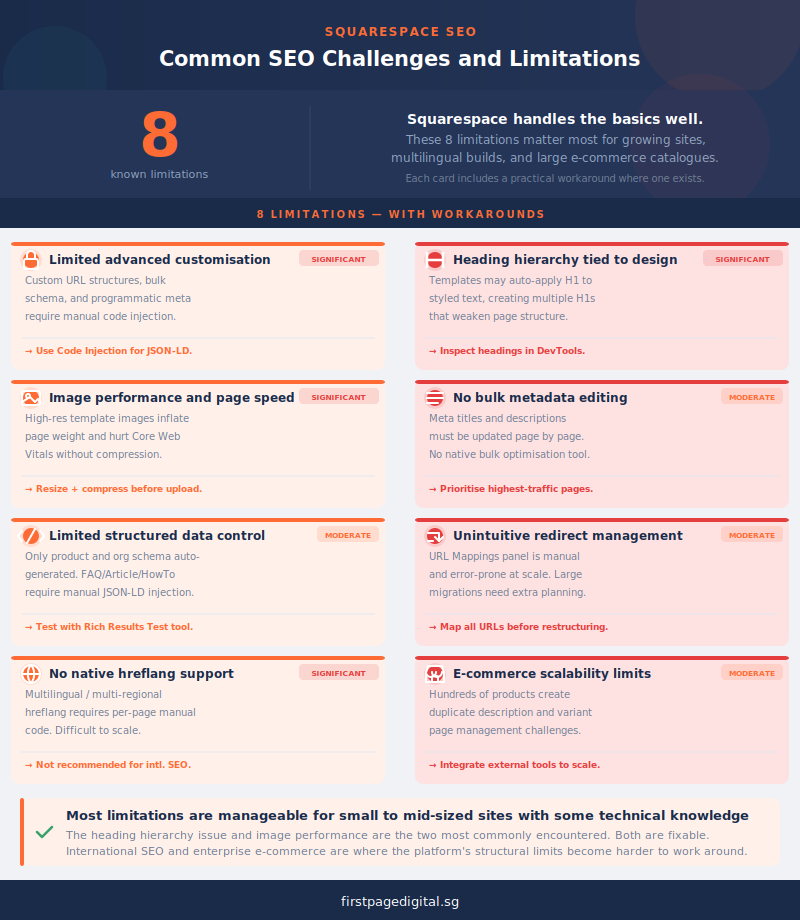
Squarespace handles many SEO basics automatically, but this simplicity can restrict flexibility for advanced users. Features such as fully custom URL structures, detailed schema markup, or programmatic metadata management are limited without adding custom code blocks. While most small to medium sites will not need these capabilities, enterprise or technically complex projects may find these restrictions limiting.
Heading Structure Tied to Design
One of the most common issues reported by SEO practitioners is how Squarespace links heading hierarchy to design styling. Some templates automatically apply H1 tags to certain styled text, which can lead to multiple H1 elements or uneven heading hierarchies. These issues can confuse search engines and weaken page structure. Users need to manually inspect headings and adjust text blocks or styles to maintain one clear H1 and a logical H2–H3 progression.
Image Performance and Page Speed
Squarespace websites often suffer from heavy images that slow down performance. Because design is central to the platform, many templates rely on large, high-resolution visuals. Without compression, lazy loading, or optimised file naming, these assets can negatively impact Core Web Vitals and search rankings. Site owners should always resize images before upload, use descriptive filenames, and take advantage of Squarespace’s built-in compression options where available.
Metadata and Bulk Editing
Squarespace allows meta titles and descriptions to be customised on each page, but bulk editing remains tedious. Large sites or eCommerce stores with many product pages may find updating metadata time-consuming, as the platform lacks built-in bulk optimization tools. This limitation makes ongoing SEO management less efficient compared to more flexible content management systems.
Structured Data and Rich Results
Squarespace automatically applies some structured data to pages, such as product schema or organization markup, but customization options are minimal. Users who want to add more specific schema, like FAQs or articles, must inject JSON-LD code manually using code blocks. This requires basic coding knowledge and regular testing to ensure that schema stays valid.
Redirect and URL Management
Redirects in Squarespace are managed through the URL Mappings panel, which can be unintuitive for non-technical users. For sites with frequent restructuring, manually entering redirects can be cumbersome and prone to errors. Large migrations or eCommerce catalog updates may require additional planning to maintain link equity and avoid 404 issues.
International SEO Challenges
Squarespace does not provide native support for managing hreflang tags across multilingual or multi-regional sites. Implementing hreflang systematically requires adding code manually to each page, which becomes difficult to scale. This limits the platform’s efficiency for businesses targeting multiple countries or languages.
E-commerce Scalability
Squarespace performs well for small to medium-sized stores, but scaling to hundreds of products introduces challenges. Managing duplicate product descriptions, handling variant pages, and optimising large sets of product images require additional effort. Advanced catalog management, dynamic content generation, or automation may require integration with external tools.
Squarespace vs WordPress for SEO: When to Choose Which
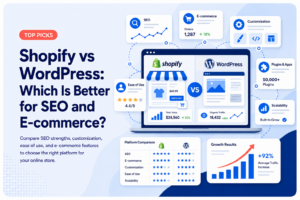
Users evaluating Squarespace for SEO are almost always comparing it to an alternative. WordPress is the most common reference point. Here is a scenario-based guide to which platform is the better choice, based on what the SEO work actually looks like in each case.
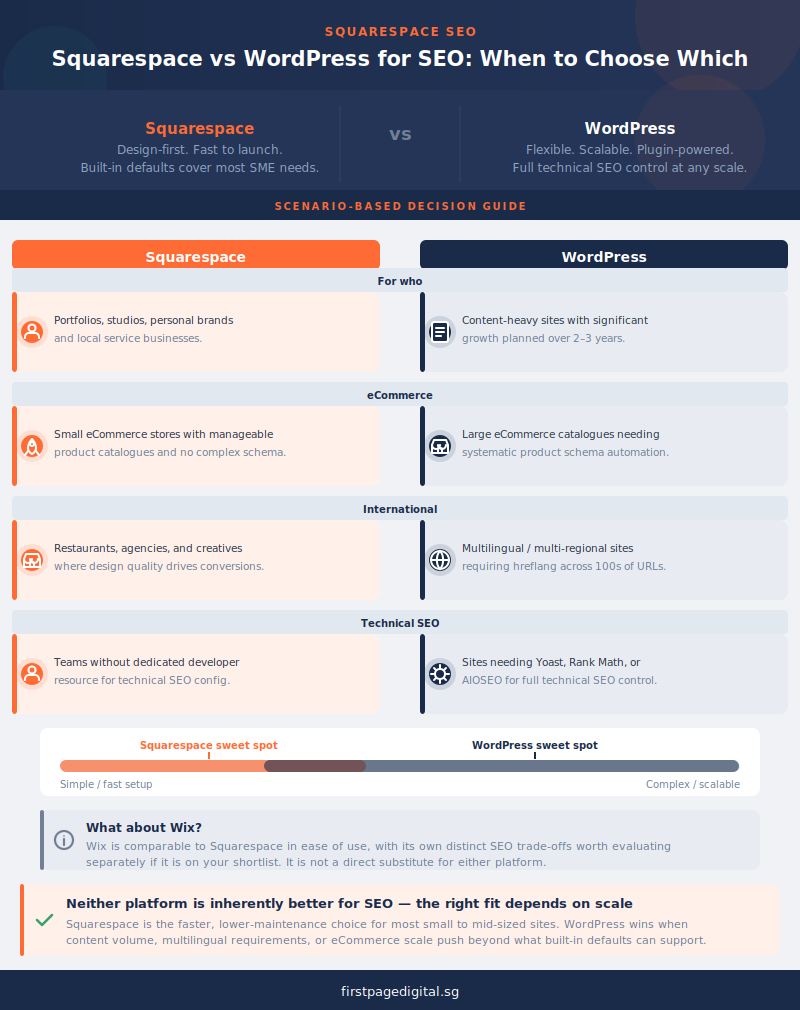
Choose Squarespace when: you are building a small to mid-sized site where design quality, ease of maintenance, and speed of setup matter as much as maximum SEO control. Portfolios, local service businesses, personal brands, restaurants, studios, and small eCommerce operations where the product catalog is manageable and the primary SEO challenge is content quality rather than technical architecture all fit comfortably within Squarespace’s capabilities. Teams without dedicated developer resource for technical SEO configuration will also find Squarespace’s built-in defaults cover more ground without requiring expert intervention.
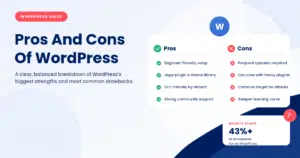
Choose WordPress when: your site is content-heavy and will grow significantly over time, requiring granular technical SEO control at scale. Large eCommerce catalogs where product schema needs systematic automation, multilingual or multi-regional sites requiring hreflang implementation across hundreds of URLs, sites needing complex schema types beyond what Squarespace generates, and businesses planning to invest heavily in content marketing over the next two to three years are all cases where WordPress’s flexibility and the SEO plugin ecosystem (Yoast, Rank Math, AIOSEO) provide meaningful advantages that Squarespace cannot match.
Wix is the third common alternative in this category, comparable to Squarespace in ease of use, with its own distinct set of SEO trade-offs that are worth evaluating separately if you are considering it. If you are still deciding which platform is right for your specific SEO goals, our guide to the best CMS for SEO compares all major platforms across the dimensions that matter most for organic performance.
Frequently Asked Questions
Is Squarespace good for SEO?
Yes, for small to mid-sized sites where design quality and ease of use are the primary priorities. Squarespace handles mobile responsiveness, HTTPS, XML sitemaps, clean URLs, and basic structured markup automatically, and it integrates well with Google Search Console. The limitations appear when sites require complex schema automation, multilingual SEO with hreflang, bulk metadata management across large content archives, or technical control beyond what the platform’s admin interface exposes. For those use cases, a more configurable platform like WordPress is a better fit.
Is Squarespace better than WordPress for SEO?
Not in absolute terms. WordPress offers significantly more control over advanced technical SEO. But Squarespace handles the fundamentals well and is easier to manage for non-technical teams. For a small portfolio site, local service business, or personal brand, Squarespace can rank competitively with disciplined execution. For a large eCommerce operation, a multilingual site, or a content-heavy publication, WordPress’s plugin ecosystem and configurability provide advantages that Squarespace cannot replicate. The right choice depends on site complexity and SEO ambition, not on which platform Google inherently prefers.
Can you do SEO on Squarespace?
Yes. Squarespace provides per-page meta titles and descriptions, XML sitemaps, SSL, canonical tags, GSC integration, mobile responsiveness, and basic structured markup. These cover the SEO fundamentals for most small to mid-sized sites. Advanced SEO (custom schema injection, precise robots.txt control, bulk metadata management, or hreflang implementation) requires additional work via code blocks or workarounds that are not available in the standard admin interface. Squarespace is not SEO-limited in the way that some hosted website builders are, but it is not as SEO-configurable as a self-hosted WordPress installation.
How do I improve my Squarespace website’s SEO?
Start with site-wide configuration: Marketing → SEO for global settings, then connect Google Search Console through Squarespace Analytics. For each page, write unique meta titles (50 to 60 characters) and descriptions (140 to 155 characters) via Pages → page settings → SEO tab. Fix heading structure: ensure one H1 per page and logical H2 and H3 hierarchy. Compress all images before uploading and add descriptive alt text to every one. Build a deliberate internal linking structure and audit not-linked pages regularly. Monitor rankings, indexing errors, and Core Web Vitals in Google Search Console monthly. These steps address the most common Squarespace SEO gaps identified across thousands of live sites.
Squarespace SEO: The Balanced Assessment
Squarespace is a capable SEO platform for the sites it is designed for. Small to mid-sized businesses, portfolios, local services, and personal brands can build strong organic visibility on Squarespace with disciplined execution: correct heading structure, compressed images with descriptive alt text, unique and complete meta titles and descriptions, a deliberate internal linking strategy, and consistent GSC monitoring. The platform handles the infrastructure layer reliably. The work that determines whether a Squarespace site ranks well is the editorial and configuration work, and that is true on any CMS.
Where Squarespace has genuine limitations, the challenges section of this guide names them specifically. Hreflang is not supported natively. Bulk metadata editing does not exist. Robots.txt and sitemap customisation are restricted. Custom schema requires code injection. These are real constraints that affect specific types of sites, and they are worth weighing honestly before committing to the platform for an SEO-intensive project.
If you are running a Squarespace site and want to audit whether its SEO configuration is complete and performing well, or if you are considering Squarespace for a new project and want an experience-based view of what SEO on the platform actually looks like in practice, First Page Digital’s SEO services include Squarespace site audits and optimisation as part of our broader work with Singapore businesses across multiple CMS platforms. If you are still deciding which CMS is right for your SEO goals, our guide to the best CMS for SEO gives you the full comparison.