An orphan page is a live page on your website with no internal links pointing to it, meaning neither users nor search engine crawlers have a navigable path to reach it from the rest of the site. Because search engines discover and evaluate pages primarily through links, orphan pages are often crawled late, indexed inconsistently, and rarely rank, even when the content on them is strong.
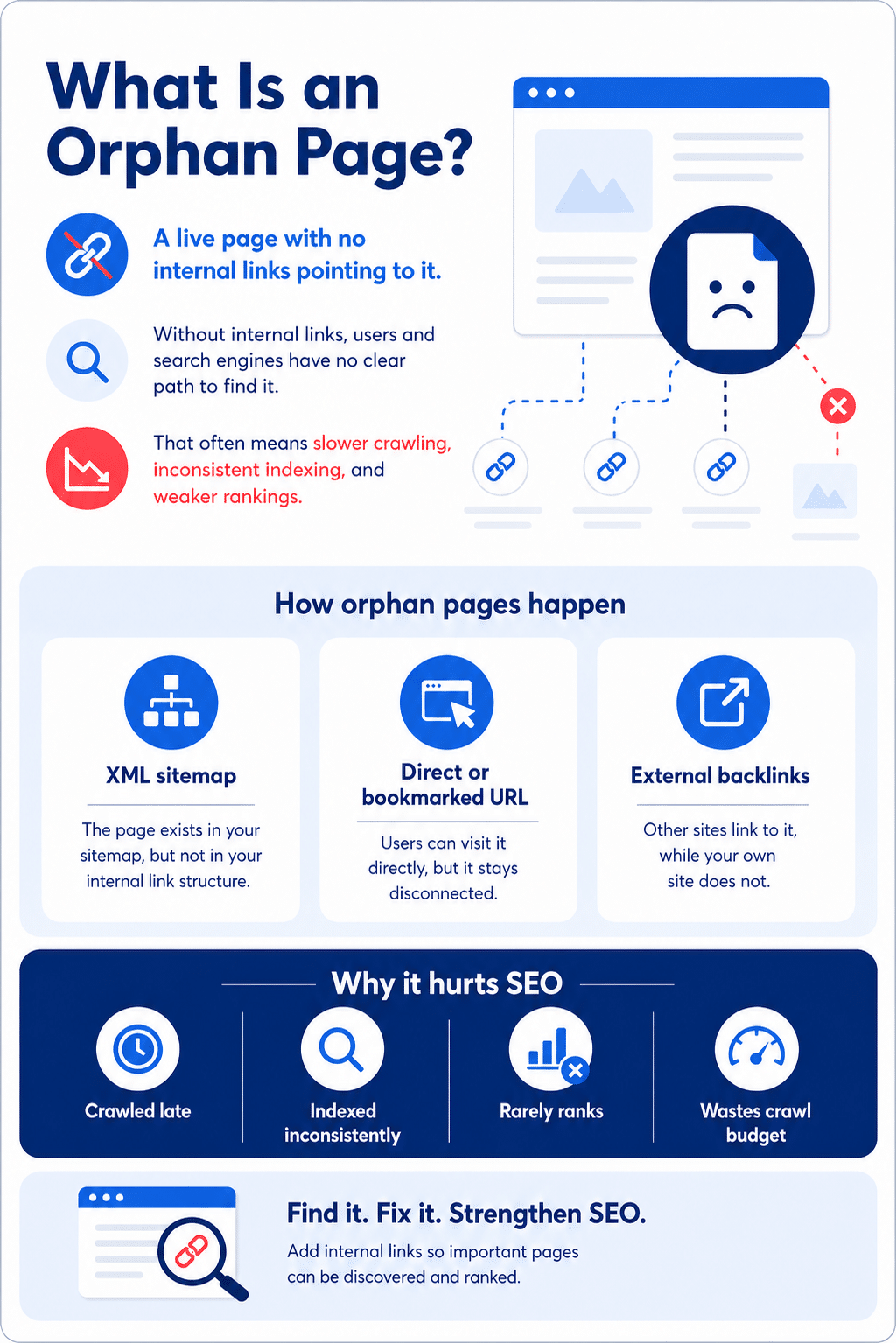
An orphan page can exist in a few ways:
- It may be listed in your XML sitemap.
- It may receive visits from a direct URL or a bookmarked link.
- It may have external backlinks that bypass your site navigation.
That makes it different from a dead-end page. A dead-end page can be reached from your site but has no links out. An orphan page cannot be reached through your site at all, in either direction.
Why Do Orphan Pages Matter for SEO?
When a page has no internal links, it falls out of your customer journey and your search footprint. That hurts users, rankings, and revenue.
Users cannot find it
Without links, there is no path to the page. A user following your navigation, search results, or internal recommendations will never arrive there.
- Important content like FAQs, policies, and product variants becomes invisible to real visitors.
- Sessions stall, bounce rates rise, and conversions suffer.
Googlebot may not discover or trust it
Crawlers use links to find and prioritise URLs. Without them, orphan pages are often discovered late, crawled infrequently, or skipped altogether.
- Even when listed in a sitemap, weak link equity reduces the chance of indexing or consistent rankings.
- A page can appear in your sitemap and still go crawled but not indexed if it lacks inbound links reinforcing its value.
It exposes hidden or unmanaged content
Orphan pages accumulate through migrations, expired campaigns, and CMS automation, and large numbers are a reliable indicator of governance debt.
- Duplicate themes, outdated claims, and compliance issues can remain live and unseen.
- Content sprawl becomes harder to audit when pages are unreachable through normal navigation.
It wastes crawl budget and dilutes authority
When bots spend crawl allowance on disconnected pages that do not help users, the rest of the site absorbs the cost.
- Link equity does not flow into the page or out to connected sections.
- Topical authority fragments when pages covering related subjects are not linked together.
It creates analytics blind spots
Traffic arriving at an orphan from bookmarks or external links registers as a one-way visit with no referral chain, so attribution breaks down and funnel performance becomes unmeasurable for those pages.
It hurts UX and accessibility
When key information is unreachable through normal navigation, users cannot find what they need, and support teams end up fielding avoidable queries because the answers exist but are buried out of reach.
Cleaning up orphan pages strengthens discoverability, consolidates authority, and restores a clear path from entry to conversion.
What Causes Orphan Pages?
Orphan pages usually appear when site changes outpace link hygiene. The patterns below cover most cases.
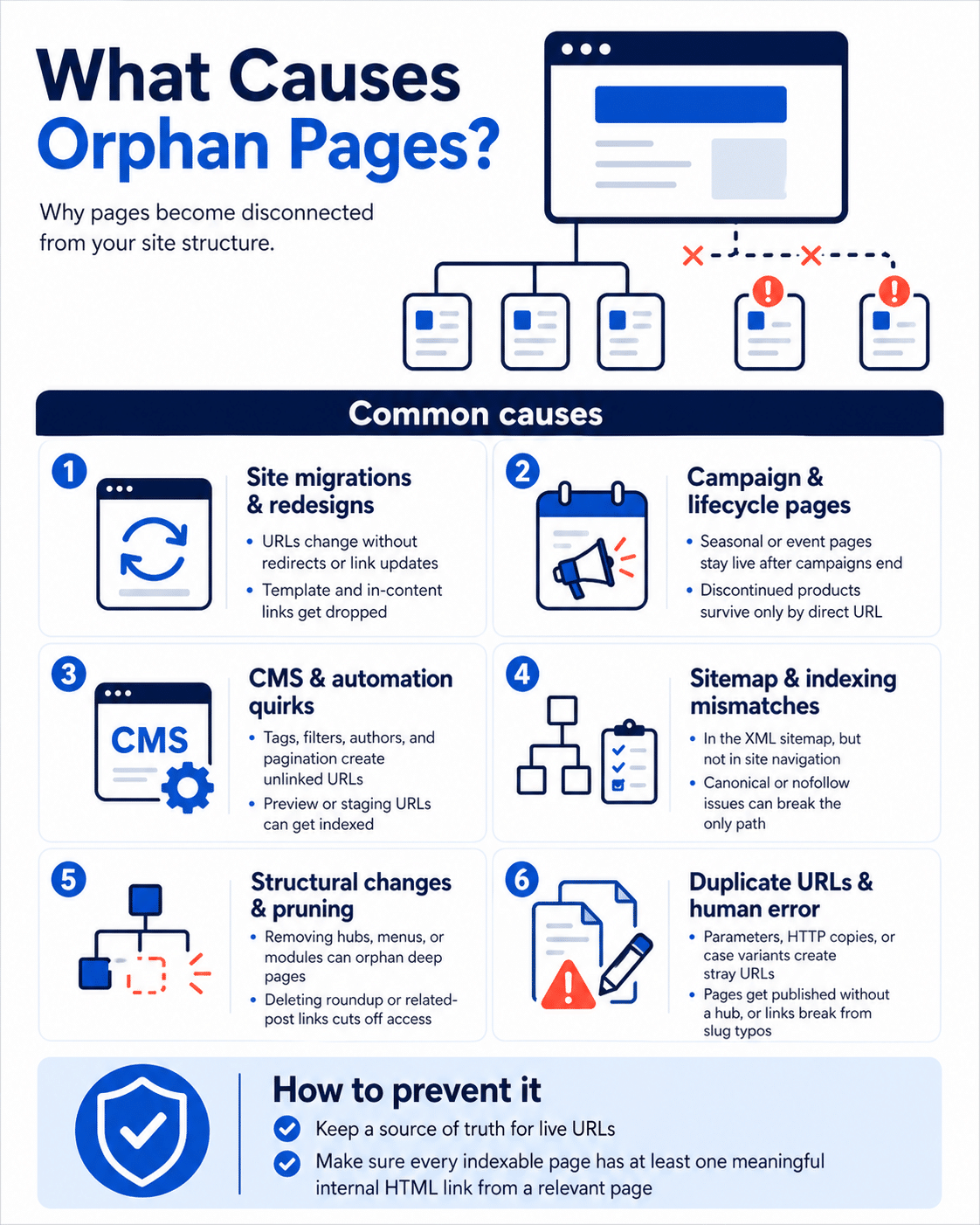
Site migrations and redesigns
Migrations are the single most common source of orphan pages. URLs change, menus are restructured, and templates are rebuilt. Each step is an opportunity for existing links to be dropped without a replacement.
- URLs that change without redirects or link updates are immediately orphaned.
- In-content links embedded in templates are frequently lost when designs are rebuilt.
Campaign and lifecycle pages
Pages created for a specific campaign window are often published quickly and then forgotten. When the campaign ends, the page stays live but loses the links that directed traffic to it.
- Seasonal and event pages frequently remain indexed long after the event has passed.
- Discontinued product variants and SKUs often survive accessible only by direct URL.
CMS and automation quirks
Content management systems generate URLs automatically for tags, authors, filters, and paginated views, without always linking those URLs into the site’s navigation.
- Faceted navigation and infinite scroll can produce large volumes of URLs that receive no inbound links.
- Staging or preview URLs shared externally can get indexed and surface as orphans in production audits.
Sitemap and indexing mismatches
Adding a page to your XML sitemap does not guarantee it has internal links. The two are frequently managed separately, creating a gap between what you intend to index and what is actually linked.
- A page that canonicals away from itself while its internal links are removed becomes effectively invisible.
- Nofollow on internal links can sever the only followed path to a page, orphaning it without any visible URL change.
Structural changes and pruning
When categories, hubs, or navigation modules are retired, the pages that depended on them for their only inbound link are orphaned as a side effect.
- Unpublishing blog roundups removes the sole link source for multiple posts at once.
- Removing sidebar or related-posts modules severs the link pathway for deep pages that were never linked from anywhere else.
Parameter and duplicate URL issues
Tracking parameters, case variants, and printer-friendly versions generate URLs that are never linked internally. After a protocol or domain change, old HTTP copies frequently survive unlinked alongside their HTTPS equivalents.
Human error
Pages get published without being added to any hub or navigation, and slug typos break the intended internal link before it is ever corrected. Both are common enough that checking for them should be part of every publication workflow.
Preventing these usually comes down to two habits: maintain a source of truth for live URLs, and verify that every indexable page has at least one meaningful internal link from a contextually connected page.
How Do You Find Orphan Pages?
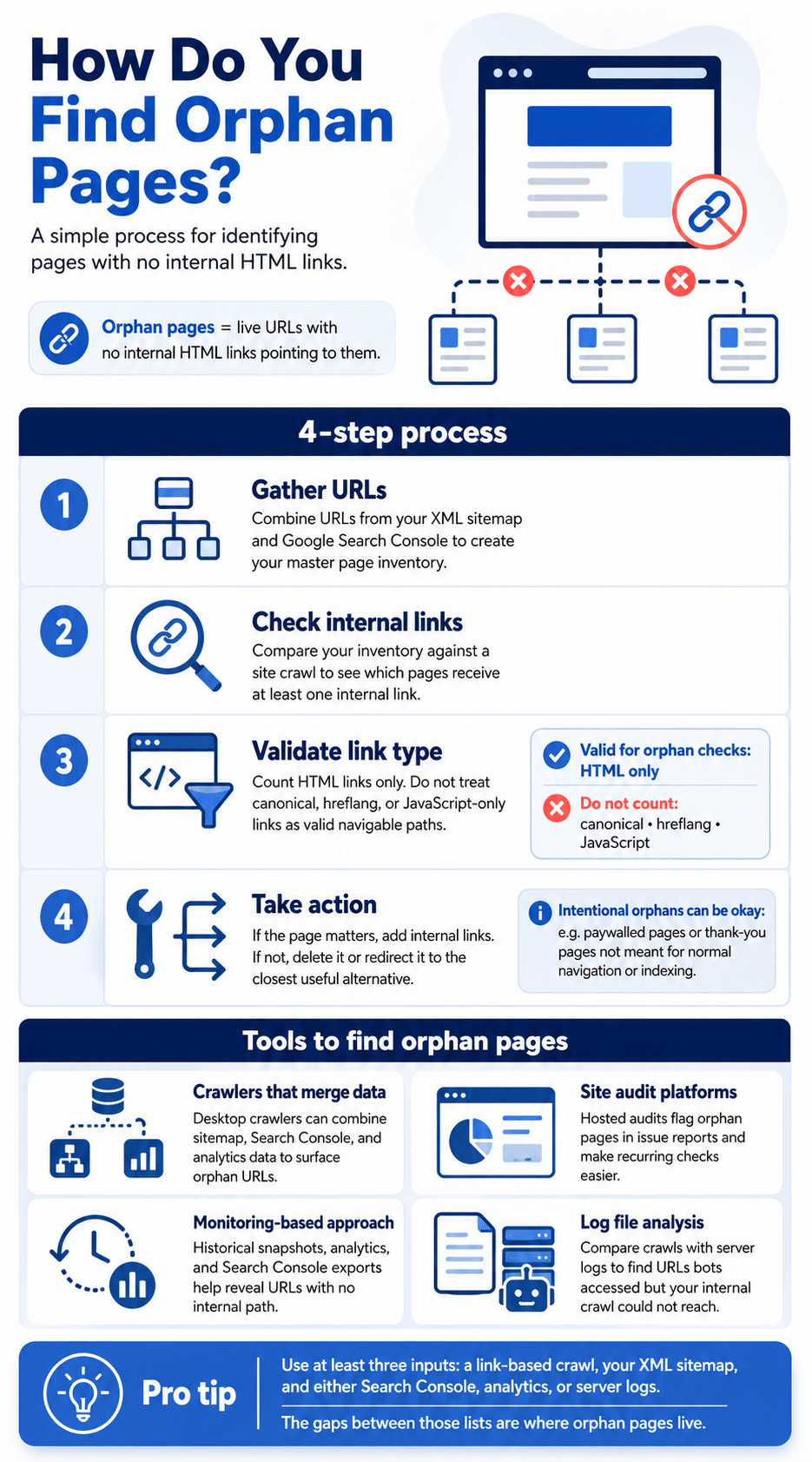
Step 1: Gather URLs
Get a complete list of URLs from your XML sitemap and from Google Search Console. This is your master inventory: the full set of pages that should exist on your site and that Google is aware of.
Step 2: Check for internal links to each URL
Check whether each page in your inventory receives at least one internal link from elsewhere on your site. A crawl tool that merges your sitemap with a link-based crawl produces this comparison automatically.
Step 3: Consider link type
Record the link type you find for each page: HTML, canonical, hreflang, or JavaScript. For orphan checks, treat only HTML links as valid navigable pathways. Do not count canonical, hreflang, or JavaScript-only links. These do not create a path that a crawler or a user can follow through standard navigation.
Step 4: Act on pages with no internal HTML links
- If valuable: add internal links. Choose the most appropriate placement: menu, footer, or in-content links from pages covering related topics.
- If not valuable: consider deleting the page, or redirecting to the closest useful alternative.
Note on intentional orphans: Some pages are deliberately unreachable through normal navigation. Examples include content behind a paywall and thank-you pages that appear only after a form submission. Keep these pages as they are if they serve a deliberate purpose and are not meant to be indexed.
Which Tools Can You Use to Find Orphan Pages?
Crawlers that merge data sources
A desktop crawler that integrates XML sitemaps and connects to Google Analytics and Search Console will surface pages with no internal path and label them as orphan. You can export a combined report that shows the discovery source for each URL.
Site audit platforms
A hosted site audit can crawl your site, read your sitemap, and compare against traffic data. It flags orphan pages inside the Issues view and supports scheduled re-crawls for ongoing checks. Enterprise crawlers offer a simple five-step workflow: build a complete URL list, run a crawl for zero inbound links, analyse, resolve, then rerun on a schedule.
Monitoring-based approach
Continuous monitors keep a historical log of pages. If you have past snapshots, you can export known URLs and cross-reference with Google Analytics and Search Console, or use log files to find requested URLs that have no internal links.
Log file analysis
Pair a full site crawl with server log analysis to find URLs that bots requested but your crawl could not reach. This is the definitive method for verifying true orphans at scale, because logs show what Googlebot actually accessed, not just what your crawl estimated.
Pro tip: Whichever platform you use, aim for three inputs at minimum: a link-based crawl, your XML sitemap, and either Google Analytics, Search Console, or server logs. The overlap and the gaps between these three lists are where orphan pages live.
Recommended Platforms for Auditing Orphan Pages
The six tools below are the most commonly used for orphan page detection, ranging from desktop crawlers to enterprise audit platforms. Each takes a slightly different approach to combining crawl and sitemap data.
Screaming Frog SEO Spider
Desktop crawler that merges a link crawl with XML sitemaps, Google Analytics, and Search Console so you can spot URLs with zero in-links and blank crawl depth. Great for one-off audits and detailed investigations.
Semrush Site Audit
Hosted audits that flag orphan pages, track internal linking gaps, and schedule re-crawls for ongoing monitoring. Useful for teams that want alerts and trend reports without maintaining desktop infrastructure.
Ahrefs Site Audit
Includes a dedicated “Orphan page” issue that lists URLs with no incoming internal links, plus guidance on fixing them. Helpful if you already use Ahrefs for crawling and backlink data.
Botify (Crawler + LogAnalyzer)
Enterprise crawling combined with server-log analysis to uncover pages bots hit that your crawl could not reach. Strong choice for very large sites where logs validate true orphans beyond what crawl data alone can verify.
BrightEdge ContentIQ
Enterprise site auditing with workflows to identify, prioritise, and re-audit issues like orphan pages at scale. Suited to organisations that need governance frameworks and scheduled checks across large teams.
Conductor Website Monitoring (formerly ContentKing)
Real-time monitoring that can filter for indexable pages with no links, then alert you when pages lose their last navigable pathway. Good for catching new orphans created by releases and CMS changes before they compound.
How Do You Audit and Fix Orphan Pages?
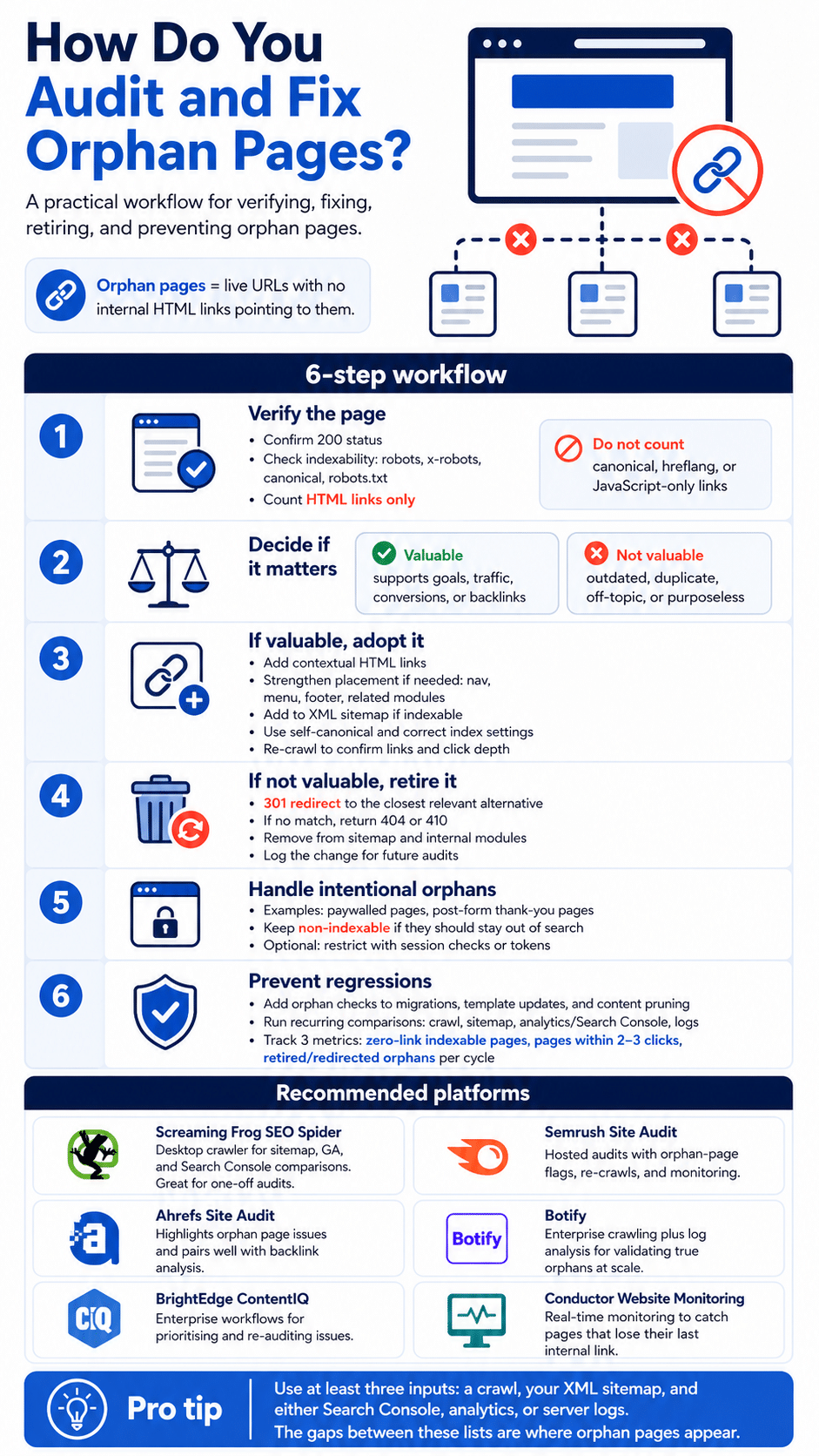
Step 1: Verify the page and its status
- Open the URL and confirm it returns 200.
- Check indexability: robots meta tag, x-robots header, canonical target, and robots.txt.
- Check that no internal HTML links point to it. Do not count canonical, hreflang, or JavaScript-only links.
Step 2: Decide if the page is valuable
- Valuable: the page serves a current goal, attracts qualified traffic, converts, or carries quality external backlinks.
- Not valuable: the content is outdated, duplicative, off-topic, or has no measurable purpose.
Step 3: If valuable, adopt it into your structure
- Add at least one contextual HTML link from a page on a related topic.
- Consider stronger placement where helpful: primary navigation, secondary menu, footer, or related modules.
- Add to your XML sitemap if it should be indexed.
- Ensure the canonical points to itself and that indexable settings are in order.
- Re-crawl to verify the page now has inbound links and a finite click depth from the homepage.
Step 4: If not valuable, retire it correctly
- Redirect with a 301 redirect to the closest relevant alternative that satisfies the same intent.
- If no suitable alternative exists, return 404 or 410.
- Remove from your XML sitemap and internal navigation modules.
- Leave a short explanation in your change log for future audits.
Step 5: Handle intentional orphans
- Some pages are meant to be unreachable through normal navigation. Paywalled content and thank-you pages after form submissions are the most common examples.
- Keep these pages non-indexable if they should not appear in search.
- Optionally gate access with session checks or tokens to prevent accidental linking.
Step 6: Prevent regressions
- Add an orphan check to every migration, template change, and content pruning project.
- Schedule a recurring comparison of crawl results, sitemap URLs, analytics landings, and server logs.
- Track three metrics over time: count of indexable pages with zero inbound HTML links; percentage of pages within two to three clicks from a hub; total redirected or removed orphans per audit cycle.
Things to Watch Out for When Auditing Orphan Pages
The 12 considerations below cover edge cases that routinely trip up orphan audits. Most errors come from one of four areas: misreading indexing cues, misidentifying which link types count, missing technical variations, or failing to track improvement.
Indexing nuances
Intentional orphans exist. Paywalled articles, checkout flows, and thank-you pages are often designed to be unreachable from normal navigation. Keep them non-indexable if they should not appear in search. Do not treat them as issues to fix.
Sitemap presence does not equal indexing. A URL in your XML sitemap can be discovered, yet still be ignored if it has no internal links or carries little authority. Sitemap submission is a hint to Google, not an instruction. Internal links carry the weight.
Mind robots controls. Meta noindex directives and x-robots headers can be correct for gated pages. For public content, ensure these are not left behind after experiments, launches, or migrations.
Link types that count
Count only real pathways. Treat HTML links as valid. Do not rely on canonical, hreflang, or JavaScript-triggered links for discoverability. None of these create a path a crawler or user can follow through standard navigation.
JS-heavy navigation can hide paths. Single-page apps and delayed rendering can fail to expose links to crawlers. Server-render critical navigation or provide crawlable fallback links wherever indexability matters.
Breadcrumbs and related modules help. Contextual links inside the body carry the most weight. Breadcrumbs, related-posts sections, and hub links reduce orphan risk across deep page hierarchies without requiring structural changes.
Hreflang needs real links too. Language and country versions should be linked from their hubs. Hreflang annotations alone do not create a navigable path and do not resolve orphan status.
Technical edge cases
Parameter and duplicate handling matters. Normalise case variations, trailing slashes, and URL parameters. Without this, you may flag duplicates as orphans or overlook true orphans that differ from their canonical only by a minor variant.
Canonical choice affects audits. If a page canonicals to a different URL, decide whether it should remain indexable. You may fix the canonical, redirect it, or keep it non-indexable if it is only a variant of a preferred page.
Watch for soft 404s. A page that returns 200 but shows no meaningful content wastes crawl budget and contributes to indexing noise. Retire or redirect rather than leaving it as an orphan with a misleading status code.
Staging and preview URLs leak. Shared staging links can be indexed and show up as orphans in production audits. Block them with authentication, and clean up any that have already escaped to the live index.
Measurement
Measure what improves. Track the count of indexable pages with zero inbound HTML links, average click depth from hub pages, and the share of pages linked from at least one hub. Re-run after each fix cycle to verify progress and catch any regressions from new deployments.
Frequently Asked Questions
Are orphan pages bad for SEO?
Yes, in most cases. Orphan pages receive fewer crawls, rank less consistently, and earn less link equity than pages connected to your site’s internal linking graph. They also represent a governance problem: large numbers of orphan pages signal to Google that content is poorly managed. The main exception is intentional orphans like gated content and post-submission thank-you pages, which are designed to be unreachable and should be kept non-indexable.
Do orphan pages get indexed by Google?
Sometimes, but not reliably. Google may discover an orphan page through an XML sitemap or an external backlink, but without internal links reinforcing its value, the page is less likely to be indexed consistently or to hold rankings. Sitemap inclusion is a signal, not a guarantee. Internal links are what tell Google a page is worth prioritising.
How many orphan pages is too many?
There is no fixed threshold. A few intentional orphans (paywalled content, thank-you pages) are normal and expected. What matters is the pattern: if a site audit surfaces dozens or hundreds of indexable pages with no internal HTML links, that indicates a systematic governance problem, usually from migrations, CMS automation, or expired campaign content that was never cleaned up. Those should be audited and resolved, not ignored.
Should I delete orphan pages or fix them?
The decision comes down to what the page still does for the site. If it ranks for anything useful, attracts qualified traffic, converts, or has backlinks worth preserving, pull it back into your structure by adding at least one contextual HTML link from a page on a related topic. If the content is outdated, duplicative, or serves no current purpose, retire it: 301 redirect to the closest alternative, or return a 404 or 410 if nothing suitable exists. Do not leave it live and unlinked.
Can a page be an orphan if it is in my XML sitemap?
Yes. A page can appear in your sitemap and still be an orphan if it has no internal HTML links from the rest of the site. Sitemaps tell Google a URL exists; they do not create a navigable path. Google treats sitemap inclusion as a hint, not an instruction. Without internal links backing it up, a sitemap-only page may still go crawled without being indexed.
What is the difference between an orphan page and a dead-end page?
An orphan page cannot be reached through your site’s internal navigation. There are no links from other pages pointing to it. A dead-end page can be reached, but has no links pointing out from it to other pages. Both create navigation problems, but orphan pages are the more significant SEO issue because crawlers primarily discover and evaluate pages through inbound links. A page with none is effectively invisible to the linking graph.
How often should I audit for orphan pages?
At a minimum, run an orphan check as part of every site migration, template change, and content pruning project. These are the most common events that create new orphans. Beyond that, a recurring scheduled crawl combined with sitemap and analytics comparison on a quarterly basis catches drift between audits. Large or frequently updated sites should run the comparison monthly, or use a real-time monitoring tool that alerts when pages lose their last internal link.
Conclusion
Orphan pages are rarely intentional and consistently costly. The fix is manageable once it is treated as routine: keep a clean URL inventory, compare it with a fresh crawl, count only real HTML pathways, then either link valuable pages back into your structure or retire what no longer serves a purpose.
If you need help running the crawl, auditing for orphans, and implementing fixes across your site, the First Page Digital team can handle it end to end. Explore our services and get in touch: