
I spent the first few months of my digital marketing career in a B2B tech startup, publishing articles that got zero traffic. Not low traffic. Zero.
I was writing about topics nobody was searching for, targeting keywords I had no business competing for, and completely ignoring search intent.
Everything changed when I got serious about keyword research for the B2B space, and specifically when I started using Ahrefs to do it properly.
In this guide, I’m walking you through how to brainstorm seed keywords, understand search volume and keyword difficulty, and build a content plan that has a shot at ranking.
By the end, you’ll know how to use Ahrefs for keyword research and align every piece of content you create with what your audience is searching for.
Ahrefs Keyword Research Tools at a Glance
| Tool | Role in Keyword Research |
| Keywords Explorer | The main hub for keyword research. Enter seed keywords and get thousands of ideas with full metrics (KD, volume, TP, CPC, clicks) |
| Site Explorer | Spy on any competitor’s organic keywords and find gaps in your own strategy |
| Content Explorer | Discover high-traffic content ideas in any niche based on actual performance data |
| Rank Tracker | Monitor keyword rankings over time to see what’s working and what’s slipping |
| Web Explorer | Search across billions of indexed pages to find niche topics and uncover content opportunities |
| Competitive Analysis (Compare) | Compare your keyword profile against up to 4 competitors side by side to find easy wins |
| Batch Analysis | Run bulk keyword or URL analysis to speed up large-scale research projects |
| SERP Checker | Analyze any SERP in depth — see who’s ranking, their backlink count, and how hard it’d be to break in |
💡 I use Keywords Explorer and Site Explorer the most. Keywords Explorer is where research starts; Site Explorer is where I go when a client wants to understand exactly where a competitor is winning.
Step 1: Brainstorm and Enter Your Seed Keywords
Source: Ahrefs
Seed keywords are your starting point. They are short, broad terms that describe what your business does or what your audience is actually searching for.
Don’t overthink this. If you sell CRM software, your seeds may be “CRM,” “customer relationship management,” or “sales software.” Three to five broad terms is enough to get going.
Before I even open Ahrefs, I ask the client: “What would your customer type into Google the day they realized they had a problem?”
That one question consistently surfaces better seeds than staring at a blank keyword tool.
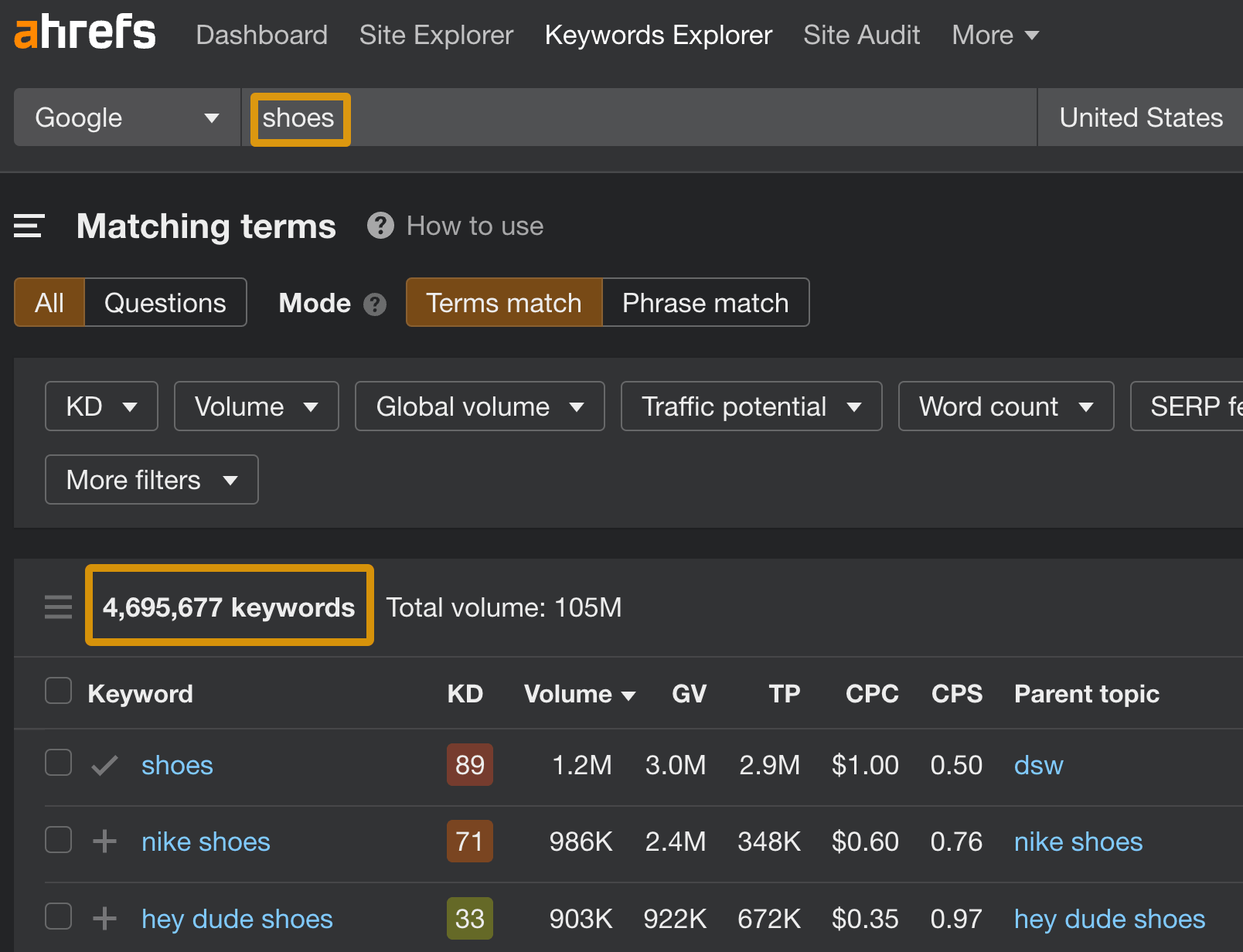
Once you have your list, head to Keywords Explorer and enter all your seeds at once. Ahrefs supports bulk entry, so there’s no need to go one at a time.
You’ll land on the Keyword Overview page. Don’t linger here too long since this page is a summary, not your research base. The real work happens in the idea reports on the left-hand menu.
One mistake I see people constantly make is that they enter branded terms or ultra-niche jargon as seeds.
If you’re a logistics company and you enter “freight forwarding API integration” as your only seed, you’ll get a very narrow set of ideas.
Instead, start broader, then filter down.
Also worth trying: plug your seeds into ChatGPT with a prompt like “What questions would someone ask before buying [product]?”
The output isn’t SEO data, but it gives you fresh angles to test in Keywords Explorer that you might never have considered.
Step 2: Explore Keyword Ideas in Keywords Explorer
Source: Ahrefs
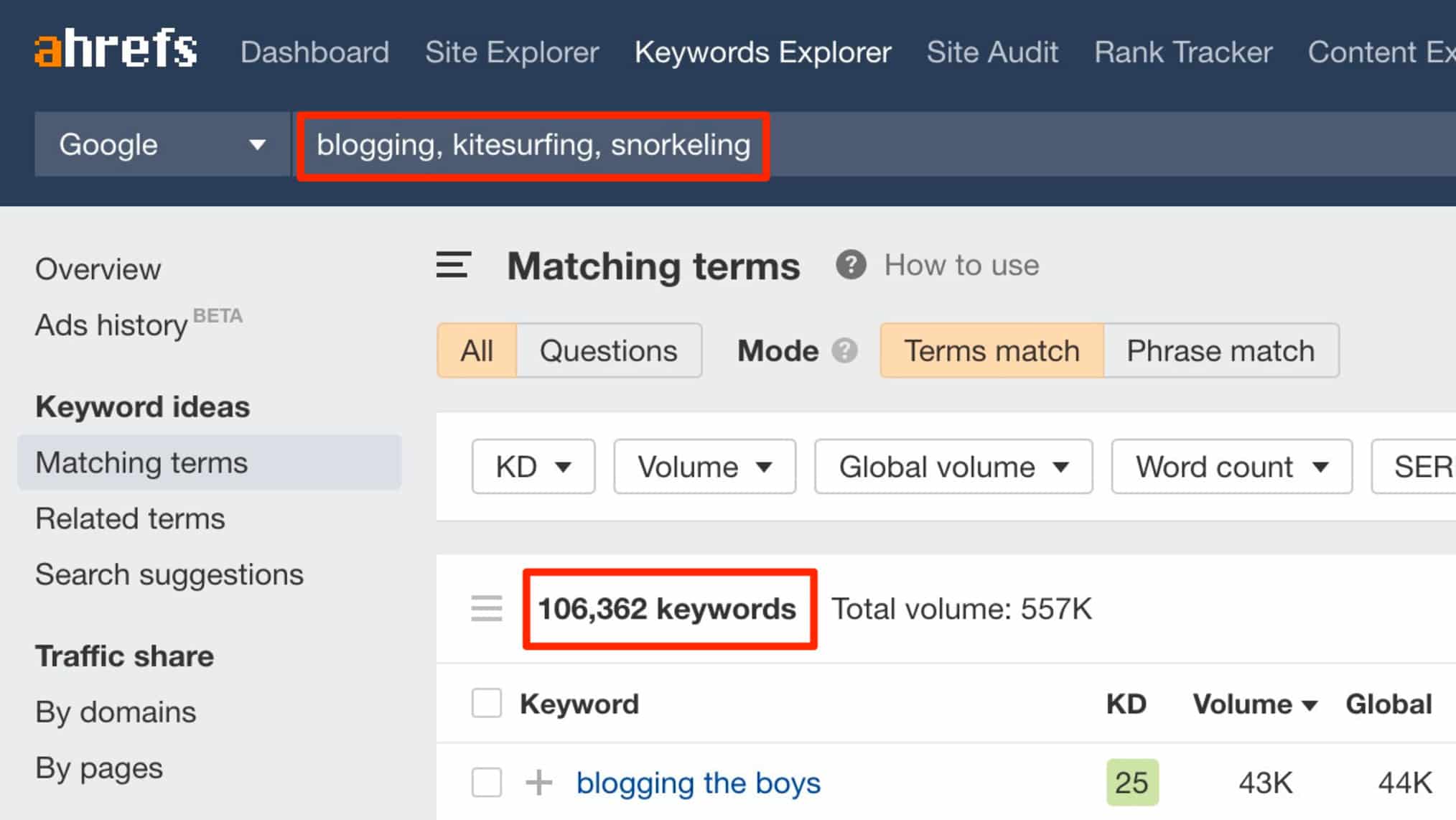
Once your seeds are in, the Matching Terms and Related Terms reports will generate thousands of keyword ideas in seconds.
Each idea comes with full metrics: search volume, keyword difficulty, traffic potential, clicks, and CPC.
The SERP Overview is right there too, so you can read the competitive landscape without leaving the page.
Here’s how I work through the four idea reports:
Matching Terms
Matching Terms shows every keyword in Ahrefs’ database that contains your seed keyword.
If your seed is “email marketing,” you’d see terms like “email marketing tools,” “email marketing for ecommerce,” and “email marketing best practices.”
These are direct expansions of your seed, so they’re high-relevance from the start.
I use this report first because it gives me the widest net. A quick KD filter (usually under 30 for newer sites) and a scan of Traffic Potential is all I need before moving on.
Related Terms
Related Terms shows keywords that are semantically connected to your seed, even if they don’t contain the exact phrase.
This is where you find content angles your competitors might be missing.
A seed of “project management” might surface “how to prioritize tasks at work” or “team workflow software.” Different wording, same audience.
I rely on this report heavily during content ideation. When a client feels like they’ve “covered everything,” Related Terms almost always prove otherwise.
Search Suggestions
Search Suggestions pulls from real autocomplete data, basically what Google serves up in the dropdown as someone types.
These tend to be longer, more conversational queries. They’re goldmines for FAQ sections, blog posts, and featured snippet opportunities.
I treat this report as a gut check. If Google is autocompleting a certain phrase, real people are searching it. That’s as direct as an intent signal gets.
Questions
Questions filters specifically for interrogative keywords: who, what, when, where, why, how.
These are almost always informational intent, which makes them great for blog content, pillar pages, and increasingly in 2026, AI Overview citations.
Out of all four reports, Questions is my most-used after Matching Terms.
When I’m building a content plan for a new site, I’ll export the full Questions report, sort by Traffic Potential, and use that as my first editorial calendar draft.
Key metrics to check on the Keyword Overview page
- Search Volume: Tells you the average monthly searches for that keyword.
- KD (Keyword Difficulty): Scores how hard it’d be to rank on a scale of 0 to 100.
- Traffic Potential: This is the more honest number. It shows the total traffic the top-ranking page gets from all the keywords it ranks for, not just the one you searched.
- Clicks: Shows how many searches actually result in a click, which matters more than volume for zero-click queries.
- CPC: Tells you what advertisers pay per click, a useful signal for commercial value.
- SERP Overview: Shows who’s currently ranking and with what type of content.
- Parent Topic: Groups your keyword under a broader theme, helping you decide whether to write a dedicated page or fold it into an existing one.
Step 3: Filter and Refine Your Keyword List
Source: Ahrefs
By now you probably have thousands of keyword ideas. The next job is ruthless filtering.
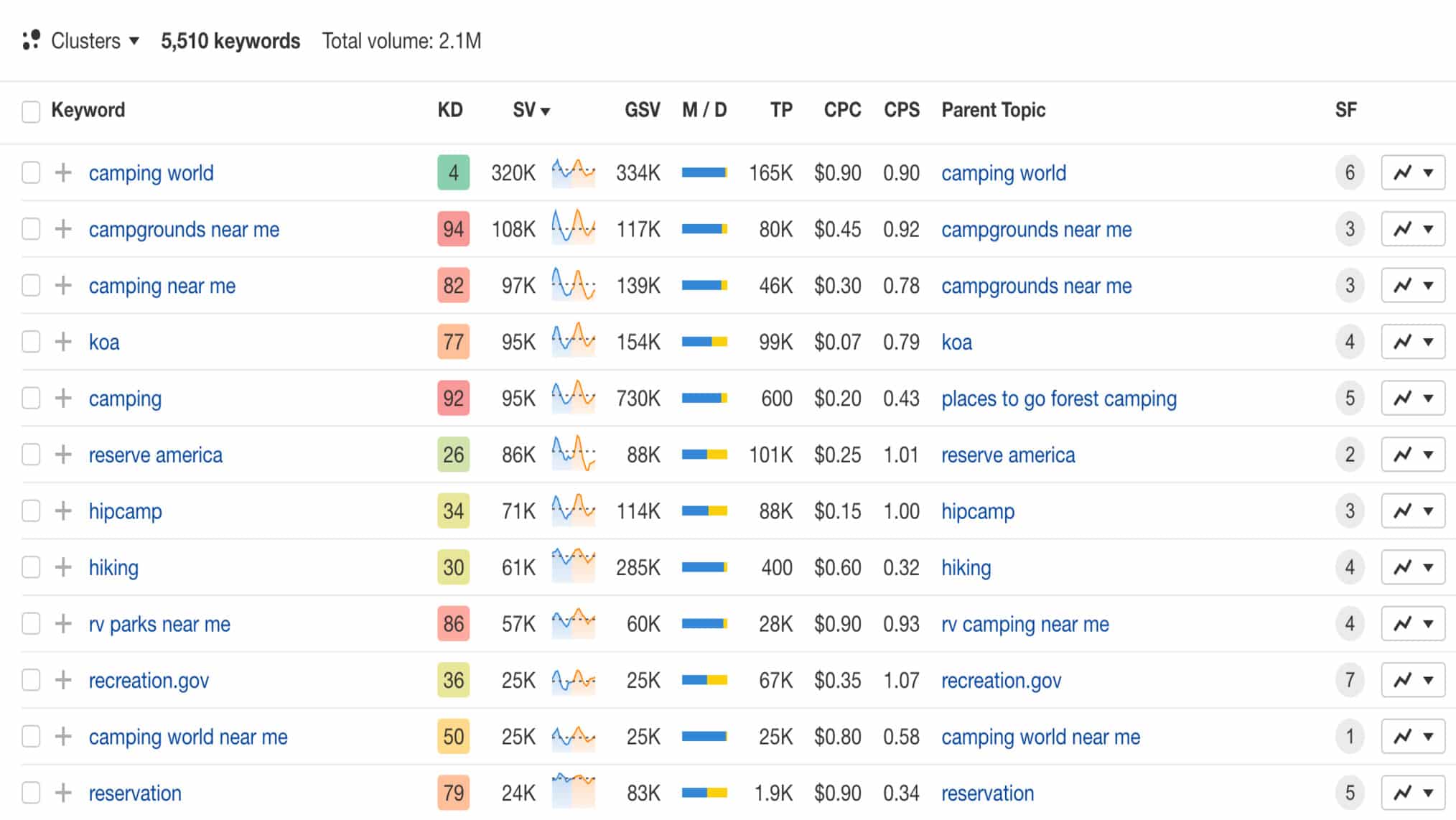
The first filter I always apply is KD. For a new client site, I start with KD under 20. For an established domain, I’ll push that to 40 or even 50 depending on their backlink profile.
After KD, I filter by Traffic Potential rather than Search Volume.
TP reflects the realistic upside of ranking for a keyword, not just the one query but the whole cluster of terms a top-ranking page typically picks up.
A keyword with 200 monthly searches but a TP of 4,000 is worth far more than one with 2,000 searches and a TP of 300.
Next, I exclude keywords that trigger heavy SERP features like featured snippets or AI Overviews for purely informational queries, especially on low-authority sites.
If the top result is a knowledge panel or a direct Google answer, the traffic floor drops sharply.
I also filter out branded keywords at this stage, unless I’m specifically building a competitor comparison strategy. Branded terms have their own playbook.
Once the filters are set, I’ll export the remaining list into a spreadsheet.
I organize by Traffic Potential descending, then manually review the top 50 to 100 for relevance.
This is important because no tool can replace that final human read.
One thing I’ve learned the hard way: don’t fall in love with a keyword just because the metrics look good.
If it doesn’t align with something the business can credibly write about, it’ll never rank with authority.
E-E-A-T is real, and a page that clearly comes from someone with no lived experience in the topic tends to underperform no matter how good the on-page optimization is.
Step 4: Analyze Search Intent Before Committing to a Keyword
Source: Ahrefs
Search intent is the reason behind a query. Get it wrong and it doesn’t matter how well you execute everything else. I learned this the hard way on a client project I’ll get to in a minute.
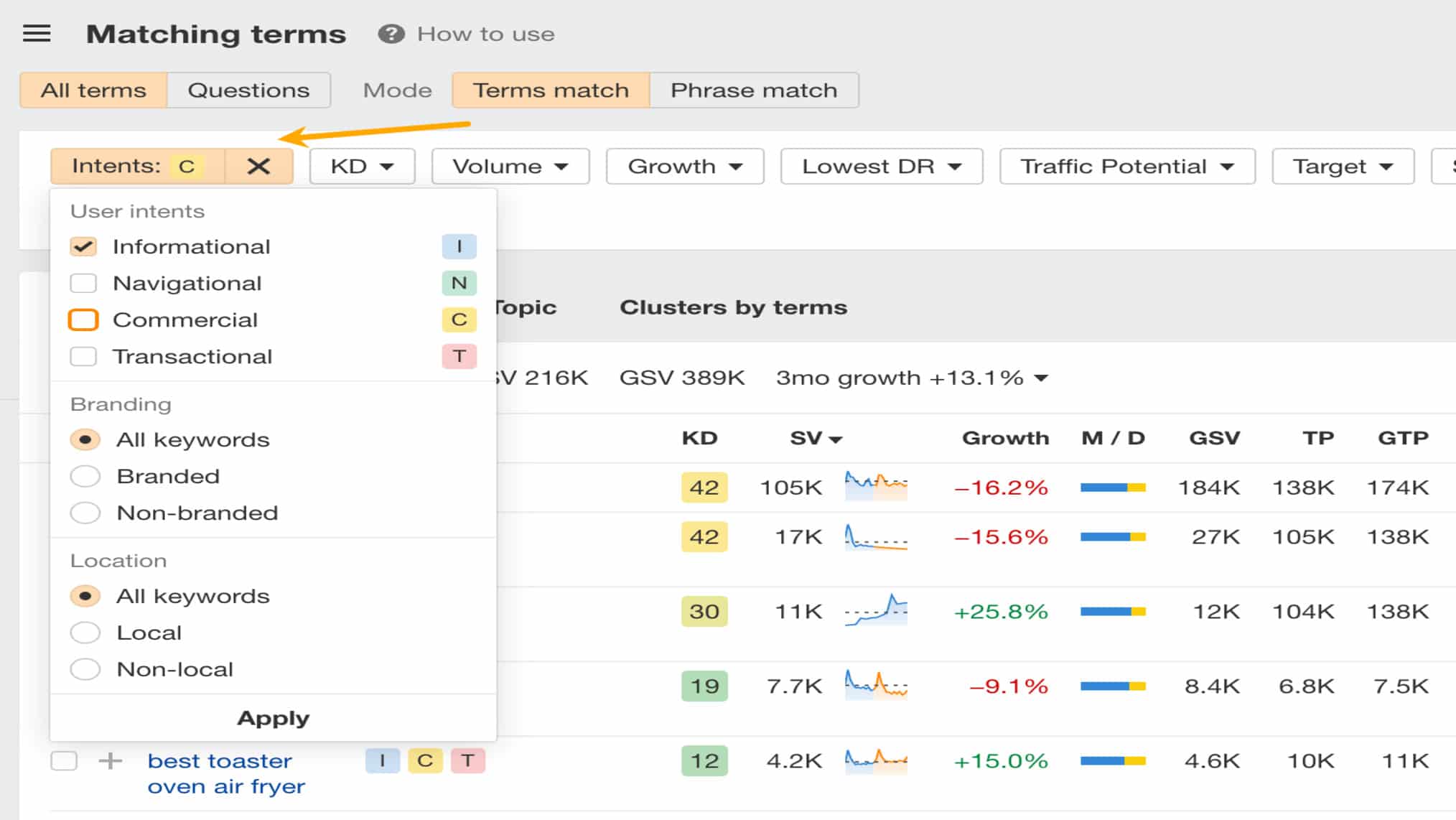
There are four intent types, and each one demands a different content format.
1. Informational Intent
The searcher wants to learn something. Queries like “what is keyword difficulty” or “how does Google index pages” fall here.
The right content format is almost always a blog post, guide, or explainer.
If you try to rank a product page for an informational query, Google will see the mismatch and your page won’t stick.
2. Navigational Intent
The searcher is looking for a specific brand or website. Think “Ahrefs login” or “HubSpot pricing page.”
There’s very little point targeting navigational keywords unless it’s your own brand. Trying to rank for a competitor’s brand name is a long shot and often not worth the effort.
3. Commercial Intent
The searcher is researching before making a decision. Queries like “best CRM software” or “Ahrefs vs Semrush” fit here.
These are high-value keywords. The right format is usually a comparison post, roundup, or review. Product pages can work, but only if the SERP is already showing them.
4. Transactional Intent
The searcher is ready to act. “Buy CRM software” or “Ahrefs free trial” are classic examples.
These keywords belong on landing pages and product pages, not blog posts. This is the mistake I see most often.
A client of mine once spent three months trying to rank a 2,000-word blog post targeting “project management software pricing.”
The SERP was stacked with pricing pages and comparison tools, the content was good but the intent match was terrible.
It never ranked above position 18. When we switched to a dedicated pricing comparison landing page, it broke into the top five within two months.
How to read the SERP Overview for intent
Look at the:
- Content Type (blog post, product page, landing page)
- Content Format (how-to, listicle, review, definition), and
- Content Angle (the hook or positioning the top pages use, like “for beginners” or “free tools”).
If the top three results all share the same format and angle, that’s your template. Don’t fight it.
Step 5: Spy on Competitor Keywords with Site Explorer 
Source: Ahrefs
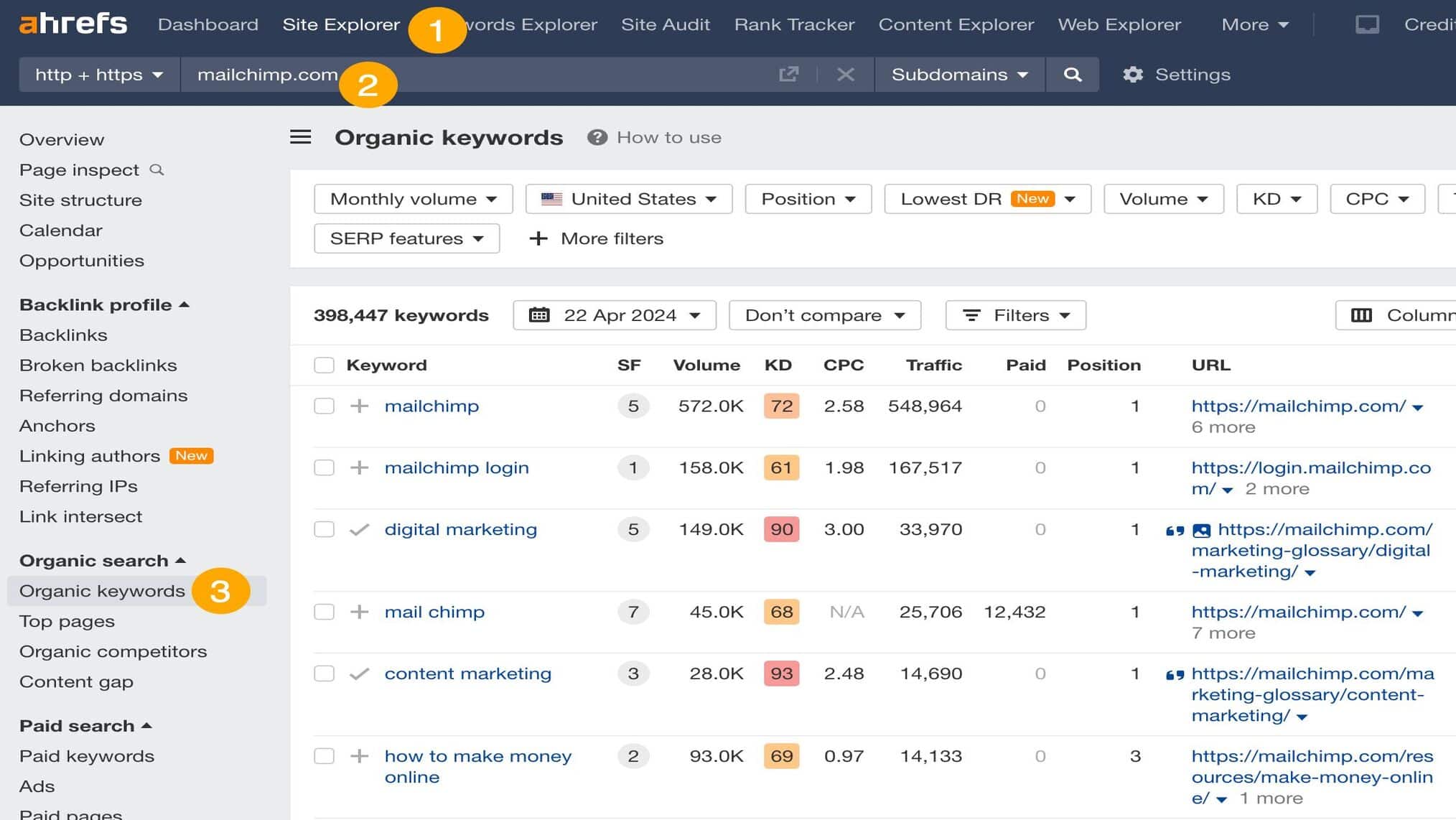
Site Explorer is where keyword research gets really competitive.
You can plug in any domain and see every keyword they’re ranking for, sorted by traffic, position, or opportunity.
I usually start with the client’s top two or three direct competitors. Not the biggest players in the industry.
The ones ranking in positions 3 to 10 for the keywords the client wants. Those are the ones worth studying.
The report I go to first inside Site Explorer is Organic Keywords.
Filter by positions 1 to 10, set a minimum Traffic volume, and you’ll quickly see which keywords are actually driving their traffic, not just what they rank for.
From there I run a Content Gap analysis.
This compares two or three competitor domains against the client’s domain and surfaces keywords the competitors rank for that the client doesn’t. That list is basically a ready-made content brief backlog.
One thing I’d advise against: don’t just export everything from a competitor’s keyword list and assume it’s all worth targeting.
Some of it will be branded, some will be outside your niche, and some will have intent that doesn’t match your business model.
Always read through the list rather than importing it wholesale into your plan.
What I find most useful is looking at competitor pages with strong Traffic Potential but relatively low backlink counts.
That’s a signal the keyword is winnable on content quality alone, and those are the pages I prioritize for clients who can’t invest heavily in link building right away.
Step 6: Assess Ranking Difficulty Using Backlink Data
Source: Ahrefs
KD score gives you a directional read on difficulty, but it’s not the full picture.
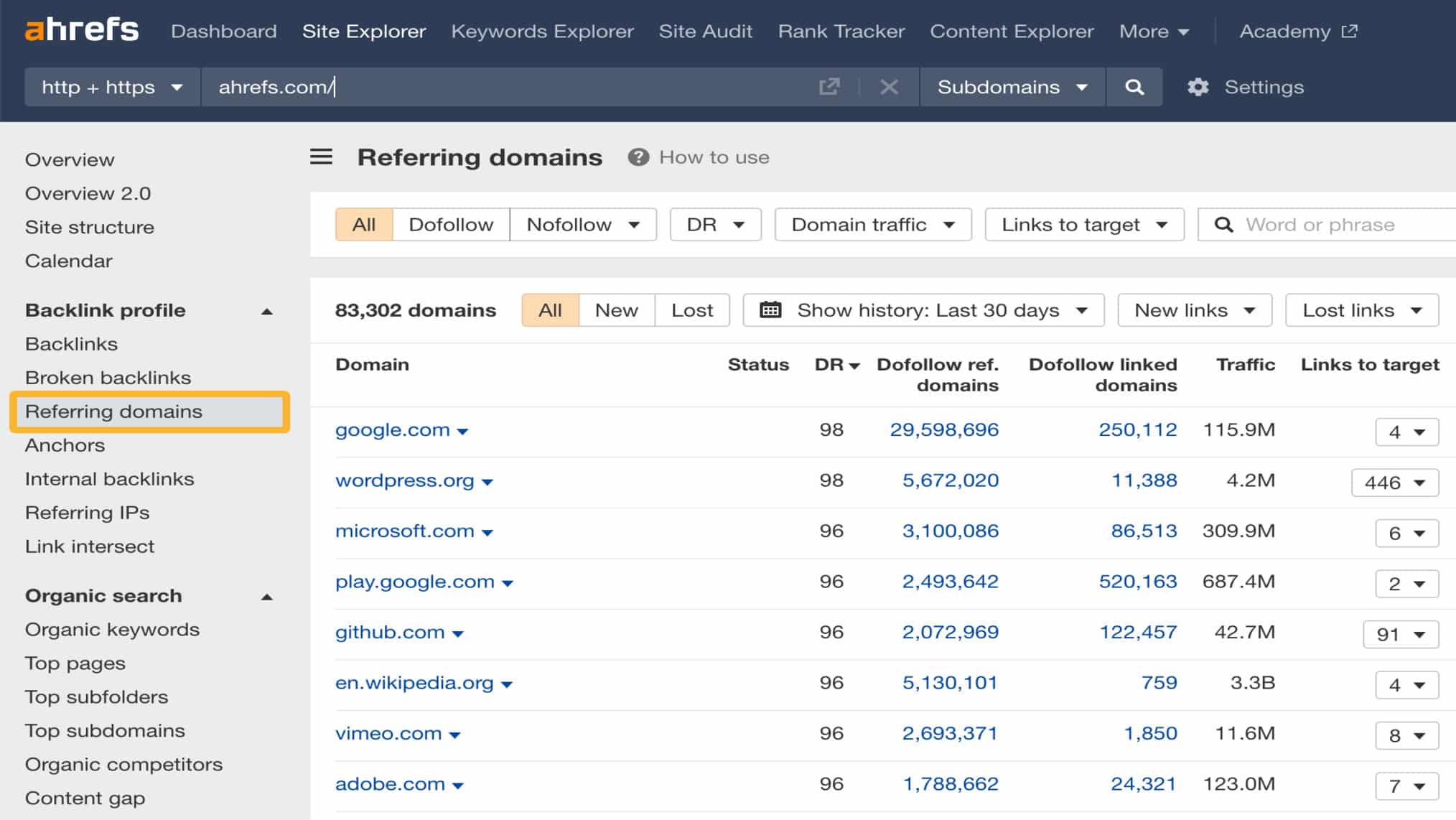
The real assessment comes from reading the backlink profiles of pages already ranking for your target keyword.
Inside the SERP Overview in Keywords Explorer, you can see the number of referring domains pointing to each top-ranking page. That’s the number that actually matters.
If the top five results all have 200-plus referring domains and your client’s site has 20, that keyword is not a short-term win regardless of what the KD score says.
I’ve seen KD 30 keywords that were practically impossible to crack because the SERP was dominated by massive publication sites with enormous authority.
On the flip side, I’ve found KD 45 keywords that were very winnable because the pages ranking for them had weak backlink profiles and thin content.
KD is an average, so always look at the individual pages.
The filters I use inside SERP Overview:
I look for pages with fewer than 20 to 30 referring domains in positions 1 to 5, combined with a Domain Rating that isn’t dramatically higher than the client’s.
If those conditions are met, content quality can do the heavy lifting.
One more thing I always check is how old the ranking pages are.
If a keyword is dominated by pages published in 2019 that haven’t been updated since, there’s a real opportunity to outrank them with a more current, comprehensive piece.
Freshness is a factor for certain query types, especially anything with a research or trend angle.
Step 7: Group Keywords and Build Your Final Content Plan
Source: Ahrefs
Now that you’ve filtered, analyzed intent, checked competitor gaps, and assessed difficulty, it’s time to build the actual plan.
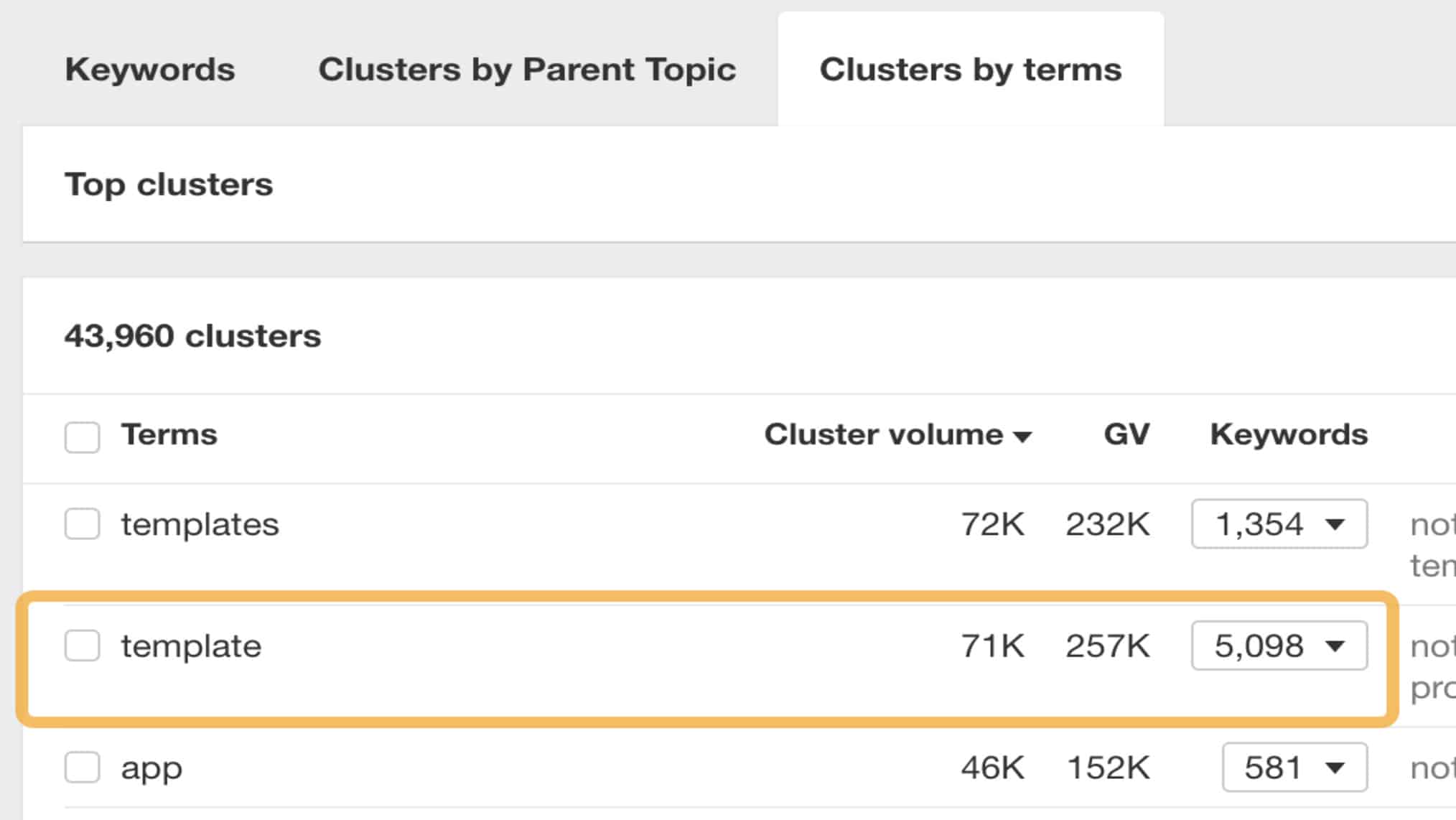
I group keywords by topic cluster first. All keywords that share the same Parent Topic in Ahrefs get considered for a single page.
There’s no point writing four separate articles when one well-structured page can rank for all of them.
After clustering, I prioritize by a simple scoring system:
- Traffic Potential
- KD, and
- Business relevance
High TP, low KD, and directly relevant to the business is a green light. Low TP, high KD, and loosely related is a pass for now.
From there I map each cluster to a content type (blog post, landing page, comparison page) based on intent, and assign a rough priority tier.
- Tier 1 is published in the first 60 days.
- Tier 2 follows over the next quarter.
- Tier 3 is the backlog.
I deliver this as a spreadsheet to clients with columns for target keyword, supporting keywords, content type, intent, estimated TP, KD, and priority.
It’s not glamorous, but it’s the thing clients reference for the next six months. If you can get it right, you’ll save everyone a lot of back-and-forth.
Ahrefs, AI Overviews, and Keyword Research in 2026
Source: Ahrefs
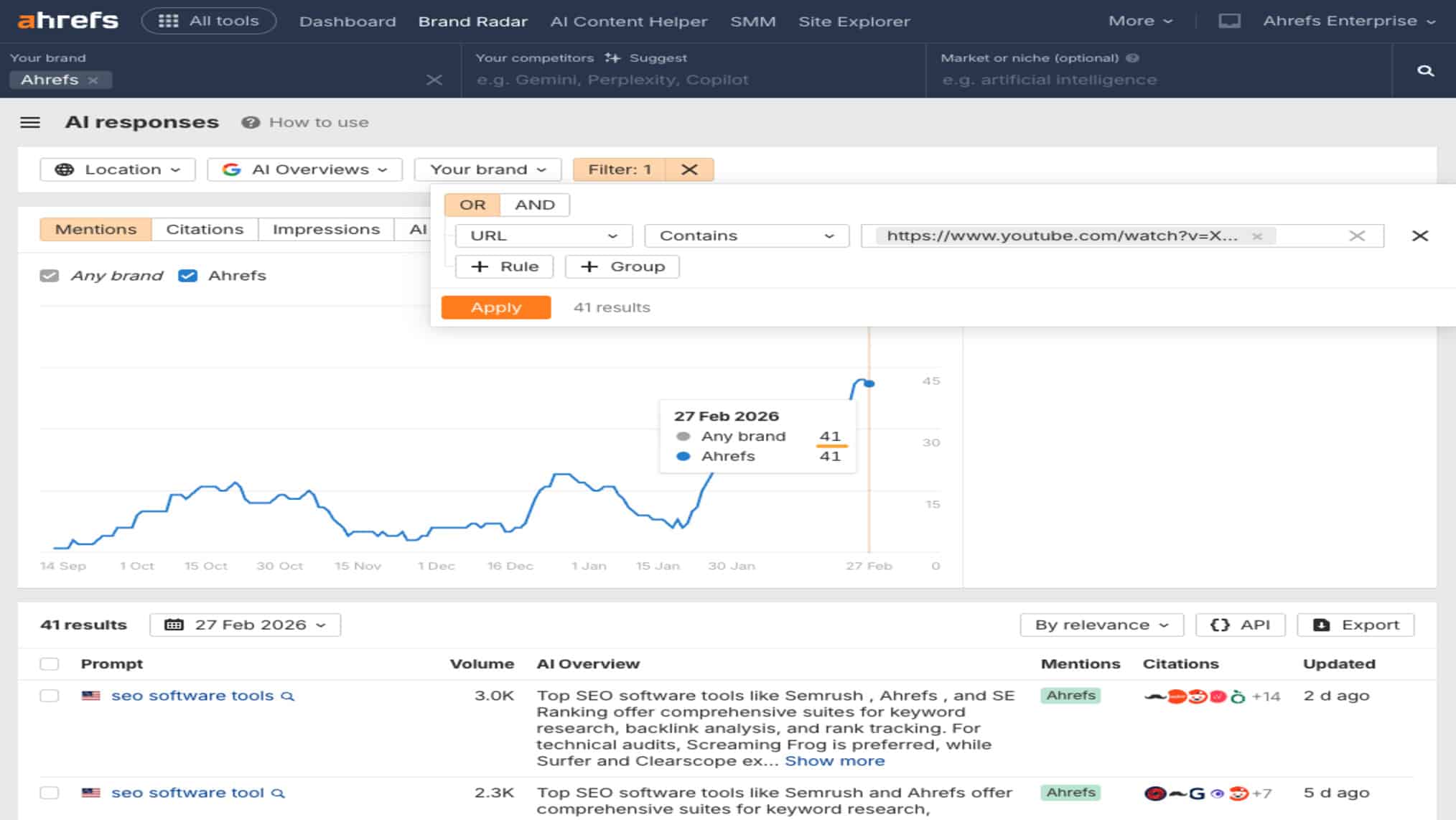
If you’ve noticed your click-through rates dropping even when your rankings held steady, AI Overviews are likely part of the reason.
Ahrefs’ own research found that AI Overviews reduced clicks to top-ranking content by 34.5% in 2025, and an updated study published in February 2026 pushed that number to 58% 😬
This changes how I approach keyword research, specifically for informational queries.
I now factor in whether a keyword is likely to trigger an AI Overview before recommending it for a content-heavy investment.
Question-based queries, “why” queries, and definition-style searches trigger AI Overviews the most, according to Ahrefs’ analysis of 146 million SERPs.
That doesn’t mean I avoid those keywords. It means I approach them differently.
For AI Overview-heavy queries, the goal shifts from ranking to being cited inside the overview itself.
Ahrefs data shows that 99.9% of AI Overview keywords are informational, and while ranking in the top 10 used to strongly predict citation, that overlap has dropped sharply to around 38% as of early 2026.
So topical authority and content depth matter more than position alone.
The pages getting cited tend to be well-structured, comprehensive, and come from sites with real topical authority.
What this means practically: don’t abandon informational content, but pair it with a clear distribution strategy.
A blog post that gets cited in an AI Overview and shared on LinkedIn and in email newsletters delivers compounding value even if the organic CTR is lower than it used to be.
Visibility is still visibility, even when it doesn’t always translate to a direct click.
Stop Guessing, Start Ranking
Keyword research is the foundation everything else is built on. Your content plan, competitor strategy, and shot at ranking in AI Overviews all start here.
What I’ve walked you through in this guide is the exact process I use with clients: brainstorming seed keywords, exploring ideas in Keywords Explorer, filtering by traffic potential and keyword difficulty, matching content to search intent, spying on competitors in Site Explorer, and assessing ranking difficulty before committing to anything.
But if you’d rather hand this off to a team that does this every day for some of the most competitive markets in the region, get in touch with First Page Digital for a FREE strategy call worth $2000 today.
Frequently Asked Questions
1. Is Ahrefs better than Semrush?
It depends on what you need it for. Ahrefs wins on backlink data and keyword research depth, while Semrush has stronger PPC data and a broader marketing toolkit. For pure SEO research, most professionals I know reach for Ahrefs first.
2. Is Ahrefs good for keyword research?
Yes, it’s one of the best tools available for it. Keywords Explorer gives you metrics that most other tools don’t surface as cleanly, especially Traffic Potential. This shows the realistic upside of ranking for a keyword rather than just the search volume of one query.
3. Can I use ChatGPT for keyword research?
Yes, but only as a brainstorming layer. ChatGPT is useful for generating seed ideas and surfacing questions your audience may ask, but it can’t give you real search volume, keyword difficulty, or traffic potential data.
4. Is Ahrefs good for beginners?
It’s not the most beginner-friendly tool, but it’s learnable. The interface can feel overwhelming at first because of how much data it surfaces, but Ahrefs has solid documentation and a YouTube channel that covers most use cases well.
5. Is Ahrefs Keyword Explorer free?
No, Keywords Explorer is a paid feature. Ahrefs offers a free keyword generator tool at ahrefs.com that gives you a limited set of ideas but for full access to metrics like traffic potential, keyword difficulty, and SERP Overview, you need a paid plan.