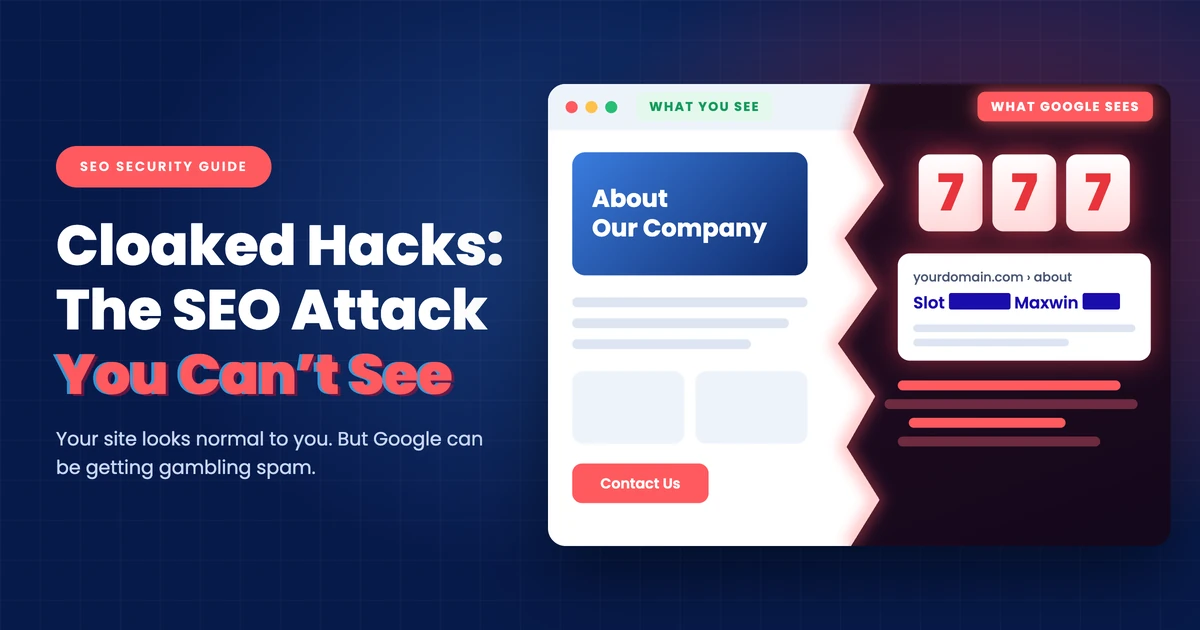
A cloaked hack is when someone gets into your website and serves spam to search engines, while people opening the site in a browser still see the normal page. In October 2026, my team found one on a client’s site, a Singapore services business, where at least 9 pages had served Indonesian gambling content to crawlers. By 26 October, Google was showing slot gambling titles against 8 of the company’s URLs, including its About, Services, and Contact pages.
What worries me most is how calm everything looked while this was going on. The pages looked fine in a browser, their source code was clean, and Ahrefs showed no ranking change in Singapore that we could put down to the hack. We found it through a site: search and Search Console data, so if you’re responsible for a website, those are the two places I’d look first.
What A Cloaked Hack Is
Cloaking means showing search engines something different from what people see, and it’s listed as a violation in Google’s spam policies. The same page notes that hackers sometimes use it to make a hack harder for site owners to detect, and that’s what separates this from a defaced homepage. You aren’t looking at a broken site, because the attacker has gone out of their way to keep it looking fine to you.
As I see it, the goal is to borrow your site’s standing in Google rather than to hurt you directly. A gambling operator can’t easily get a new site trusted overnight, so I think an established company’s address looks like a shortcut, especially when the owner has no reason to go looking. It doesn’t take a big site either, because Ahrefs, which sells this data, showed this client ranking for just 8 keywords in Singapore as of 26 October 2026.
It isn’t a rare problem. Sucuri’s report for January to December 2024, based on 70.8 million remote scans by a company that sells website security and malware cleanup, counted 422,741 websites with SEO spam and 79,817 detections of gambling spam. Its scanner works from the outside, simulating a typical visitor, so I suspect cloaked cases are undercounted.
What It Looked Like On A Client’s Site
Every hijacked page carried the same title, with only the gambling brand swapped: “[BRAND]: Agen Slot Qris 5000 Unduh APK Slot88 Pasti Maxwin…”. That’s Indonesian slot promotion, and the pages declared an Indonesian locale, so we read them as aimed at Indonesian search results. Underneath sat a scraped store template from a large electronics brand, filled with slot promotions, guaranteed-win claims, and fake reviews.


Two of the hijacked pages in a Google site: search. We’ve masked the company’s name and address, the gambling brand, and any page text that could identify the site.
These pages were also built to stay in Google. They set meta robots to “index, follow”, and on the 2 pages where we confirmed it, the canonical tag, which tells Google the main address for a page, pointed to the client’s own URL. One version carried several hundred gambling keyword links, all pointing back to the same address, while the login and register links went to a Cloudflare Pages site named after the client.
It also looks recent, although we can’t give an exact start date. AhrefsBot recorded normal titles on the client’s About and Contact pages between 15 and 17 September 2026, and by 24 October it was being served spam on other pages.
Why Cloaked SEO Spam Is So Easy To Miss
Almost every check you’d normally run came back clean, which is why I think this type of hack is so dangerous. Browser checks from Singapore showed the normal pages, and the source code had no trace of the spam or the outside sites it relied on. The sitemap dates for the affected pages hadn’t changed either, which pointed us to the server or the code rather than the page content. So I’d expect anyone opening those pages in WordPress to see nothing wrong.
Rankings didn’t give it away. According to Ahrefs, the site’s 8 Singapore keywords were all branded, 7 were in the top 3, and nothing had moved that we could attribute to the hack as of 26 October 2026. So I think a monthly SEO report would have looked perfectly normal while Google was showing gambling titles against the company’s own pages.
You’d think pretending to be Googlebot would expose the spam, but it didn’t. On 26 October 2026, we sent 120 requests from 1 office IP address, using 20 browser and bot user agents that included Googlebot, Bingbot, GPTBot, and AhrefsBot. For each URL, all 20 got exactly the same normal HTML, and Google’s Rich Results Test got the normal page as well, so the strongest evidence was in what Google and Ahrefs had already recorded.
| Visitor | What It Was Served | When |
| Googlebot | Spam on 8 URLs, shown by gambling titles in Google’s index | Last crawl before 26 October 2026 |
| AhrefsBot | Normal on About and Contact pages | 15 to 17 September 2026 |
| AhrefsBot | Spam on 4 pages, normal on the homepage | 24 to 25 October 2026 |
| Claude’s web fetcher | Spam on 3 pages | 26 October 2026, morning |
| Claude’s web fetcher, repeat check | Normal on the same 3 pages | 26 October 2026, about 10:50 SGT |
| 20 browser and bot user agents, 1 IP address | Normal page, byte for byte | 26 October 2026, about 10:50 to 10:55 SGT |
| Google’s Rich Results Test | Normal on the 1 page tested | 26 October 2026, 10:53 SGT |
| Chrome browser, Singapore | Normal page | 26 October 2026 |
The real AhrefsBot was served spam on 25 October, yet our spoofed AhrefsBot got the normal version of the same page a day later. Two explanations fit, and our tests can’t tell them apart: either the hack checks the visitor’s IP address as well as the bot name, or it stopped serving spam on the morning of 26 October. Whichever it was, I wouldn’t treat a clean result from a spoofed bot as clearing a site.
We made a similar mistake ourselves. The first version of our report listed 4 pages as clean after Claude’s web fetcher got the normal page, and then Google’s index and Ahrefs’ crawl records showed they’d been serving spam. Spoofing does have its uses, since Sucuri described a November 2024 case where an analyst saw casino pages just by spoofing a bot in a browser. So I’d say it can prove you’ve been hacked, but it can’t prove you haven’t.
What It Can Cost You
The most direct cost is to your reputation, because Google can end up showing gambling titles against your About, Services, and Contact pages. Those are the pages I’d expect a careful buyer to check before making contact, and on this site, Google Images showed 2 of the spam titles as well. I think that’s worse than a ranking drop, because a prospect who sees it won’t tell you. So the KPIs I’d worry about are brand click-through rate, contact page visits, and enquiries.
Google can also act against the site. Its help page on Security Issues says affected pages can carry a warning label in search results or a warning page in the browser, and its page on Manual Actions lists cloaking among the problems that can get pages ranked lower or left out of results.
I can’t tell you that either happened here, because our 26 October findings don’t show it, and we hadn’t measured a ranking loss by then. Even so, I think a warning on your site could affect every channel that sends people there, paid campaigns included.
AI tools can pick this up too. On the morning of 26 October 2026, Claude’s web fetcher, which the AI assistant uses to read a page, received gambling content when it requested the company’s About, Services, and Contact pages. Any AI crawler served the same thing would read it as the company describing itself. I can’t show you an AI answer that repeated it, but if your buyers ask AI tools about suppliers, wrong descriptions in those answers are a risk I’d take seriously.
The site had also picked up a wave of spam links, with 79 of the 100 newest live backlinks in Ahrefs coming from throwaway domains, mostly .shop and .link, first seen between 19 and 28 September 2026. Their auto-generated anchors claimed the company sold SEO links and reseller packages. The timing overlaps with the hijacked pages, although we haven’t confirmed that the two are connected, so I’d include a backlink review in any cleanup either way.
How To Check Your Own Site
The best evidence is what Google has already stored rather than what your site shows you today, and you can check most of that without being technical. If these checks find nothing, that’s reassuring without being proof, but if they find anything at all, I’d bring in your developer or host straight away.
Checks You Can Run Yourself
- Search Google with site: and spam terms, such as
site:yourdomain.com maxwin, then try “slot”, “casino”, and “judi” (Indonesian for gambling), along with a plainsite:yourdomain.com. Look for titles or descriptions in a language you don’t use, and check Google Images too. - Open Security Issues and Manual Actions in Search Console, which is where Google tells you what it has found. I wouldn’t read an empty report as an all-clear, though, since it says nothing about what Google hasn’t found.
- Read the Performance report by query, page, and country, looking for gambling terms, unfamiliar URLs, or impressions from countries you don’t serve.
- Check the Page indexing report for URLs you don’t recognise, because Google shortens addresses in its results. We couldn’t identify 2 of the hijacked URLs from search alone, and neither matched anything in the sitemap.
- Use URL Inspection and click View crawled page on your homepage and your About, Services, and Contact pages. It shows the HTML returned when Google crawled the page, so gambling text there tells you what Google received.
- Look at your page titles in a crawl history such as Ahrefs Site Explorer, because it shows what a real crawler recorded and when. That’s how we dated this hack, and it’s also how you’d see a spam title come back after a cleanup.
Test live URL is worth running too, but I wouldn’t let a clean result settle the question. Google lists URL Inspection and the Rich Results Test under a separate crawler called Google-InspectionTool, so a hack looking specifically for Googlebot might not fire for it. That’s my reading of how this could play out rather than something Google says about hacks, although spam in a live test would certainly mean the problem is still active.
What To Ask Your Developer Or Host
Server logs can get you closer to an answer. I’d ask your developer or host to pull requests from real Googlebot, confirmed with Google’s reverse DNS check, and compare the size of those responses with what a normal browser received. They could also repeat the browser check through an Indonesian VPN, since our tests hadn’t established whether location changed what people saw.
How To Fix It
Editing the affected pages in WordPress won’t fix this, because the spam isn’t in the content you can see there. So I’d bring in your developer or host from the start, since the same pages can be hijacked again if the cause stays on the server. Google’s cloaked keywords guide on web.dev is a good starting point, although it still mentions the retired Fetch as Google tool, which has since become URL Inspection.
Back Up Before You Touch Anything
Google’s guide says to back up the whole site and database offline before you change anything, and to save a copy of any file before you delete or replace it. That gives your developer evidence to work from and a way back if a cleanup step breaks something. I’d label that copy as infected, though, so nobody restores from it by mistake.
Find What’s Serving The Spam
Our findings pointed to the server, so on a WordPress site, I’d look first at code that runs before WordPress loads. That means .htaccess, wp-config.php, index.php, any mu-plugins, and unfamiliar PHP files in wp-content, along with any admin users or plugins nobody recognises.
Google’s guide adds a few more things to look for, including a RewriteRule pointing to a PHP file, files changed around the time of the infection, unusually large files, and jumbled code using functions such as base64_decode, eval, or gzinflate. Your developer shouldn’t stop at the website folder either, because in the Sucuri case I mentioned, the cloaking logic sat in a file above the web root, loaded by a single added line in the theme’s functions.php.
Clean It And Close The Gap
Once you’ve found the source, your developer can replace .htaccess with a clean version, delete the malicious files, and reinstall WordPress, themes, and plugins. Google’s cleanup guide recommends a clean installation rather than an upgrade, because upgrades can leave old files behind.
Removing the spam only deals with the symptom, so they also need to find how the attackers got in and close it, which usually means updating software and removing whatever you don’t use. Google’s guide then says to change the passwords on every account connected to the site, including FTP, database, administrator, and CMS logins.
Get The Spam Out Of Google
Cleaning the site doesn’t clear Google straight away, because it has to recrawl each page first. For real pages that were only hijacked, use Request indexing in URL Inspection so the clean version replaces the spam. Google says there’s a daily limit on those requests, and that indexing typically takes a day or so but can take much longer.
URLs the attackers created should return a 404, and you can use the Removals tool if you want them gone sooner. That tool only hides a URL for about 6 months rather than deleting anything, and Google’s cleanup guide says to keep it away from good pages that were only damaged, since it’s meant for pages you never want in results.
If Security Issues or Manual Actions listed something, fix everything first and then select Request Review, and Google says most security reviews take several days or weeks. After that, I’d report any spam site using your name to whoever hosts it, which in this case was Cloudflare, and go through the spam links as part of a backlink audit.
What Happened Here, And How To Catch The Next One
On this client’s site, the hacked content was removed, the vulnerabilities were found and tightened, and Search Console’s Removals tool was used on the URLs the attackers had created. To catch the next one sooner, I’d put a site: search with a few spam terms on a monthly calendar, and I’d make sure someone on your side actually reads Search Console’s messages. None of your usual KPIs is certain to move when this happens, so it’s worth looking on purpose.
What I Can’t Tell You
Our tests can’t say for certain how the hack chose who got the spam. An IP address check fits what we saw, and so does the hack having stopped on the morning of 26 October. Claude’s fetcher getting the normal page on a repeat request doesn’t settle it, because it may fetch from different addresses each time.
We also hadn’t established whether visitors from Indonesia were shown the spam, and our findings don’t show who was behind it. I’m keeping the client’s name, the gambling brands, and the details of their vulnerabilities out of this article, because I don’t want it pointing anyone at a business that’s just dealt with this. And since this is a single site, please treat it as an example of how a cloaked hack can behave rather than a rule for how they all do.
Cloaked Hack FAQs
Can a hacked website look completely normal?
Yes, because a cloaked hack is built to show the spam only to certain visitors, such as search engine crawlers. On one client’s site in October 2026, pages looked normal in a browser and their source code was clean, while Google had indexed gambling titles against 8 of its URLs. That’s why I wouldn’t judge a site by opening it yourself. A site: search and View crawled page in Search Console show you what Google received instead.
Does changing my user agent to Googlebot prove my site is clean?
No, it can prove a hack exists, but it can’t prove there isn’t one. Sucuri described a November 2024 case where spoofing a bot exposed casino pages, yet in our October 2026 test, 20 browser and bot user agents all received the normal page on a site where Google had indexed spam. One possible reason is that some hacks also check the visitor’s IP address, which a browser setting can’t fake. So I’d rely on what Google has stored, using View crawled page in Search Console.
Will editing the page in WordPress remove a cloaked hack?
Usually not, because the spam often isn’t in the page content you can edit. On the site we investigated, the sitemap dates hadn’t changed and the normal HTML held no trace of the spam, which pointed to the server or the code. Your developer should look at .htaccess, wp-config.php, index.php, mu-plugins, and unfamiliar PHP files, then reinstall clean copies of WordPress, themes, and plugins, and close the vulnerability. Otherwise, I’d expect the spam to come back.
Does a cloaked hack hurt rankings?
It can, although you may not see a drop straight away. On the site we investigated, Ahrefs showed no ranking change we could attribute to the hack as of 26 October 2026, while gambling titles were already showing in Google. Google’s help page on Manual Actions lists cloaking among the problems that can get pages ranked lower or left out of results. So I wouldn’t use rankings as your warning sign, and I’d check a site: search instead.
How long does it take for spam titles to leave Google?
There’s no fixed time, although Google’s guidance points to days or weeks once the site is clean, because it has to recrawl each page first. Google says indexing typically takes a day or so but can take much longer, and there’s a daily limit on Request indexing. If a security issue is listed, it says most reviews take several days or weeks. The Removals tool can hide hacker-created URLs sooner, although that only lasts about 6 months.
References
- Google Search Central: Spam policies
- web.dev: Fix the cloaked keywords and links hack
- web.dev: Clean and maintain your site
- Google: Google’s common crawlers
- Google: Verify requests from Google crawlers and fetchers
- Search Console Help: URL Inspection tool
- Search Console Help: Security issues report
- Search Console Help: Manual actions report
- Search Console Help: Removals and SafeSearch reports tool
- Search Console Help: Page indexing report
- Search Console Help: Performance report
- Ahrefs Site Explorer
- Sucuri: SiteCheck Malware Trends Report 2024
- Sucuri: Simple Include Statement Hides Casino Spam, Kayleigh Martin, 14 November 2024
Case findings come from First Page’s investigation, dated 26 October 2026. Information above was checked on 4 November 2026.