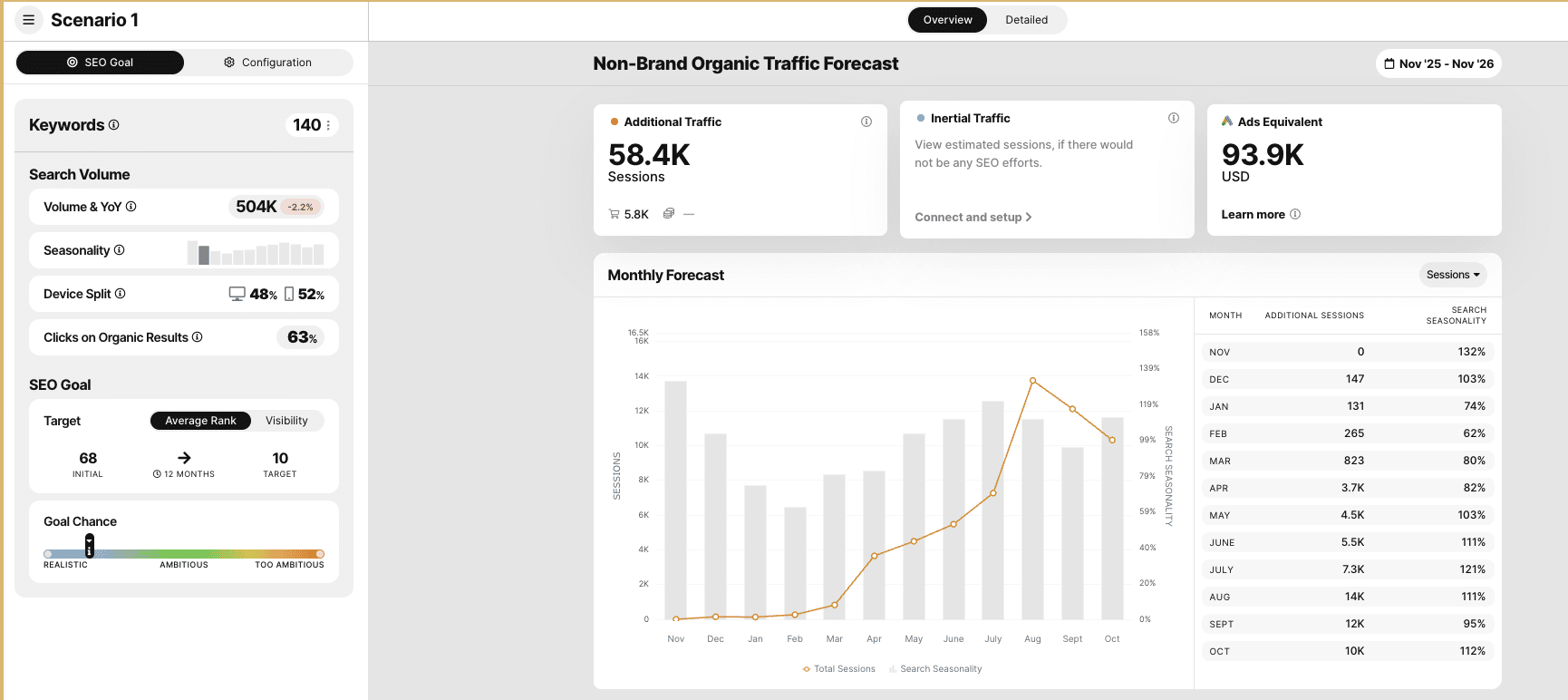
In this guide, I’m going to walk you through how we use SEOmonitor at First Page Digital to forecast traffic, no gatekeeping here. Whether you’re new to forecasting or you’ve dabbled in it before, I’m here to make sure you understand exactly how the tool works, how it can make your job easier, and how to use it to set realistic SEO goals for your clients or projects.
Forget about vague promises of “traffic growth.” We’re going to get into the nuts and bolts of how to use SEOmonitor’s data-driven insights to predict real, tangible results. By the end of this guide, you’ll know how to forecast SEO performance with confidence, set smarter goals, and optimise your strategies for long-term success.
Let’s dive in, shall we?
Creating a Traffic Forecast
Creating an accurate traffic forecast is the heart of your SEO planning, and SEO Monitor makes it easy to set everything up. Here’s a step-by-step guide to walk you through the process:
1. Set Your Start Date
The first thing you’ll need to do is pick your start date. You can choose:
- This month (if you’re ready to kick things off right now)
- Next month (if you’re planning ahead)
- Two months from now (for long-term planning)
I usually stick to this month for a straightforward approach, but you can choose based on your needs.
2. Choose Your Timeframe
Next, select your forecast’s timeframe. SEO results don’t happen overnight, so it’s important to set realistic expectations. You can choose from:
- 6, 7, 8, 9, 10, 11, or 12 months for standard forecasts.
- Or go with extended forecasts, which doubles the length of your initial timeframe with no additional improvements predicted during this period. In other words, it assumes that after the initial boost, you’ll get 100% ROI with no further resources being committed, assuming rankings don’t drop.
For simplicity and because it aligns well with real SEO ROI, I generally go with 12 months. This gives enough time for SEO efforts to show solid results.
3. Set the Progression Speed
This step is crucial because your forecast will differ depending on how aggressively you plan to push the rankings. You’ll see three options:
- Optimal Progression (for easy keyword groups)
- Moderate Progression (for medium-difficulty groups)
- Conservative Progression (for more competitive, high-difficulty groups)
I recommend adjusting the progression speed per keyword group. For easier groups, I select Optimal since they’re likely to rank quickly. For medium-difficulty groups, I’ll go with Moderate, and for tough keywords, I stick with Conservative. You might also need to go custom based on available resources and the current position of keywords.
4. Use the Target Range Toggle
This is one of my favorite features, and I suggest you always use it. The Target Range Toggle lets you forecast a range of target ranks instead of just one position. By doing so, you’re essentially creating two forecasts at once, which helps account for the inherent variability of SEO results.
I use this toggle to create a realistic variance in predicted outcomes, which gives me more flexibility and a clearer picture of potential success.
5. Consider the Goal Chance Bar
When you’re setting up your forecast, SEO Monitor will display a Goal Chance bar. It gives you a sense of how likely it is to hit your target rank based on keyword difficulty.
I usually keep the forecast between Realistic and Ambitious. I’ve never seen it go beyond Ambitious, no matter how aggressive the strategy, so staying between these two levels will give you a solid, achievable challenge with expected returns.
6. Smart Targets (Automatic Forecast Suggestions)
If you want to skip the manual setup, there’s a Smart Targets button that automatically suggests the best forecast parameters for you with a single click. It’s a great option if you’re short on time or need a quick suggestion.
7. Remember the Page 1 Rule
One thing to keep in mind: SEO Monitor automatically assumes that any keyword you place in the forecast will reach at least position 10 (page 1). If you don’t think a keyword can make it to page 1 during your forecast period, I recommend you omit it from the forecast. This helps you avoid unrealistic expectations and keeps your forecast focused on achievable goals.
More Forecast Parameters
Once you’ve set up the basic elements of your forecast, it’s time to fine-tune the predictions with some advanced settings. These parameters help you refine your forecast even further, ensuring a more accurate reflection of what you can expect from your SEO efforts.
1. Setting the Click-Through Rate (CTR)
SEO Monitor allows you to set CTR rates, either using the default settings or based on your own data from Google Analytics (GA) or Adobe Analytics (AA). The default CTR curve is a good starting point, but if you have access to specific site data, using your own CTR rates will make your forecast even more accurate.
By inputting your CTR data, SEO Monitor can predict how many clicks you’ll get from ranking on the SERP. This is crucial for estimating how much traffic a keyword might bring, especially when it ranks higher on the page.
2. Search Volume Prediction
This is one of the most important settings to enable, especially for keywords that are seasonal or have fluctuating search volumes. Search volume prediction takes into account year-on-year traffic trends, allowing the tool to adjust the forecast based on past performance. For example, if a keyword tends to spike in search volume around specific times of the year, this setting will reflect those trends.
I always recommend enabling this feature. It’s particularly useful for adjusting forecasts on keywords that experience seasonal changes or are trending up or down in search volume. With this, your forecast is more likely to reflect reality, rather than just static numbers.
3. Long Tail Effect
This option allows SEO Monitor to consider long-tail keywords—the variations of your target keyword that also bring in traffic. By enabling the long-tail effect, the tool adds extra search volume to each keyword by including related variants and semantically similar terms.
For example, if you’re targeting “buy red shoes,” the long-tail effect will add volume from searches like “buy leather red shoes,” “buy red high heels,” etc. This feature provides a more complete picture of your total traffic potential, and I always recommend enabling it.
4. Setting Conversion Rates
To predict how your forecasted traffic will convert into actual sales or goals, you can input your website’s conversion rates. Just like with CTR, you can pull these numbers from Google Analytics or Adobe Analytics. By entering your current conversion rate, SEO Monitor can estimate not only the traffic you’ll receive but also how many conversions (sales, sign-ups, etc.) those visits will generate.
This is a powerful tool for forecasting revenue, as it combines traffic predictions with real conversion data, allowing you to get a clearer picture of the ROI your SEO efforts will bring.
Interpreting Your Forecast
Once you’ve configured all the parameters, SEO Monitor generates your traffic forecast. Here’s what to look out for and how to make the most of it.
1. Additional Traffic vs. Total Traffic
One important thing to understand is that SEO Monitor shows additional traffic, not total traffic.
This means the forecast predicts the traffic you would gain based on the difference between your current keyword positions and the positions you’ve set in your forecast. It factors in your chosen progression speed and CTR assumptions. Essentially, it tells you what your SEO efforts could add, rather than reporting the total traffic your site already receives.
2. Google Ads Equivalent Cost
For every keyword in your forecast, the tool calculates the Google Ads equivalent cost based on CPCs. This is a helpful metric if you want to understand the monetary value of your forecasted SEO traffic compared to running paid campaigns.
3. Monthly Breakdown
The forecast breaks down additional traffic month by month, which helps you track progress over time. This is especially useful for reporting to clients or stakeholders, as it visualizes how SEO efforts gradually translate into measurable results.
4. Rank Range Forecasts
If you enabled the Target Range toggle, you’ll notice two lines on the graph. These represent the lower and upper bounds of your forecasted traffic, effectively giving you two forecasts at once. It provides a realistic range instead of a single-point estimate, which accounts for variability in SEO performance.
5. Actionable Insights
SEO Monitor also gives you actionable recommendations on how to achieve the forecasted results. For example, it might suggest focusing on certain keyword groups, improving content quality, or adjusting internal linking to boost rankings. These insights can guide your SEO strategy to ensure the forecast is not just theoretical but achievable.
6. Detailed Tab: Keyword-Level Data
For a deeper dive, the Detailed Tab shows all individual keywords and their forecasted metrics. You can see each keyword’s predicted position, traffic, CTR, and additional metrics like conversion potential and revenue. This level of granularity allows you to prioritize which keywords to focus on for maximum impact.
7. AI Summary
Finally, the Generate AI Summary function provides an automated overview of your forecast, highlighting its strengths, weaknesses, and key insights. This is a quick way to get a high-level understanding of the forecast without manually analyzing every keyword.
Conclusion: Forecasting Without the Fluff
And that’s a wrap! Traffic forecasting with SEOmonitor doesn’t have to feel like a secret club with a complicated handshake. By now, you should feel confident setting up your forecasts, adjusting progression speeds, enabling advanced parameters, and interpreting the results to make data-driven decisions.
Remember: a forecast is a tool, not a crystal ball. It predicts additional traffic, gives you insight into potential revenue, and helps you prioritize your SEO efforts—but it works best when combined with smart strategy and consistent execution. Use the CTR, search volume prediction, long-tail effect, and conversion rate settings to make your forecasts more realistic and actionable, and always factor in the variability with target ranges.
The beauty of SEOmonitor is that it makes forecasting approachable while still giving you powerful, detailed insights. By following these steps, you can set expectations that are realistic but ambitious, plan your resources effectively, and confidently demonstrate the value of SEO to your clients or team.
Now, go ahead and create your first forecast—or your next one—and see the difference that data-driven SEO planning can make. No gatekeeping, just results.