Singapore businesses can now claim their profile in ChatGPT through Business Hub, which OpenAI launched in beta on 10 November 2026. We claimed First Page’s profile in November, and after we sent in personal and business documents, OpenAI took most of a week to approve it.
I think every business should claim theirs, because ChatGPT can already show your business in its answers whether or not you’ve claimed it. Claiming lets you check what it says about you, and it gives you OpenAI’s own count of how often you come up. It won’t change what ChatGPT recommends, though, and OpenAI says so itself.
TL;DR
- OpenAI opened Business Hub on 10 November 2026 to eligible businesses wherever ChatGPT is available, and First Page’s Singapore profile was approved in November
- To claim, you sign in to ChatGPT, go to chatgpt.com/business-hub, find your business, and verify it, which for us meant personal ID, business documents, and most of a week’s wait
- OpenAI doesn’t list a paid plan as a requirement, but we claimed from our ChatGPT Business workspace and couldn’t add a colleague on a free account, so if you claim from a workspace, add everyone who’ll manage the profile to it first
- Once you’re approved, you can edit your profile and see mentions, profile views, website clicks, and the topics where you come up
- In the week to 21 November 2026, our dashboard counted 410 mentions and 1 website click, and Similarweb’s research suggests most people who see a brand recommended in ChatGPT search for it later rather than clicking
- Claiming doesn’t guarantee visibility or give you control over ChatGPT’s recommendations, and Business Agents, the chat feature, are only open to US businesses for now
What ChatGPT Business Hub Is
When ChatGPT names a business in an answer, people can click through to that business’s profile, which shows its details, a link to its website, and, for some businesses, its products. Business Hub is where the owner claims and manages that profile. OpenAI calls the whole programme Businesses in ChatGPT, and since it’s still a beta, the features and rules are likely to change.
Once your claim is approved, you can update the details on your profile, and online shops can add a product feed with their prices and stock. You also get insights, which OpenAI aggregates from ChatGPT conversations and only shows once there’s enough activity to pass its thresholds. OpenAI says it doesn’t share anyone’s conversations with the business.
Business Agents matter less in Singapore for now, because they’re only open to eligible e-commerce and online service businesses in the US. An agent is a business’s own chat inside ChatGPT that answers questions about what it sells, and a business can sponsor it through ChatGPT Ads, which OpenAI brought to Singapore in September 2026.
Can Singapore Businesses Claim A ChatGPT Profile?
Yes. OpenAI’s launch post says any eligible business located where ChatGPT is available can claim its profile through Business Hub, and First Page’s claim from our Singapore office was approved in November 2026. OpenAI does add that eligibility depends on the industry, the location, and its own verification and integrity checks, so not every business will get through.
What Singapore businesses can’t do yet is publish a Business Agent. Our dashboard already shows a card asking us to review our business agent’s guidelines, but the Agent insights tab says they aren’t available for our business, which fits with agents being US-only. OpenAI says it plans to bring Businesses in ChatGPT and Business Agents to more markets and categories, though it hasn’t given dates.
How To Claim Your Business In ChatGPT
These steps come from OpenAI’s help page and from claiming our own profile. OpenAI reviews every claim before you can manage the profile, so expect a wait in the middle.
- Choose the ChatGPT account that will manage the profile. OpenAI’s help page doesn’t list a paid plan. We claimed ours from our paid ChatGPT Business workspace, and when we tried to give a colleague on a free ChatGPT account access, the invite didn’t work. OpenAI says that when a business is claimed from a workspace, the people you invite may need to be members of it, so if you claim from one, I’d add everyone who’ll manage the profile to the workspace first.
- Go to chatgpt.com/business-hub and find your business. You can also open Business Hub from the ChatGPT sidebar, then search for your business by name and choose the matching listing.
- Verify your connection to the business. Depending on the business, OpenAI offers a code by text or call to the business phone number, a code sent to the business email, a TXT record added to your website’s domain, or a Shopify connection. OpenAI then reviews the claim and emails you its decision, and it says review time varies. Ours took most of a week.
- Complete the identity check. Before you can edit the profile or see its insights, OpenAI’s identity partner, Persona, checks that you’re authorised to represent the business. We had to submit both personal ID and business documents, and the business’s legal name, registered address, and registration number need to match its official records, which for a Singapore company means its ACRA details.
- Fill in your profile. Our edit screen has tabs for the business description, contact details, photos, location, and opening hours, along with a business category, and OpenAI reviews each change before it appears.

Why Claiming Your Business Matters
The main reason is that ChatGPT will describe your business whether you claim it or not. OpenAI’s terms say it may create and show a listing for a business regardless of a claim, and claiming is how you get to submit the name, address, contact details, category, opening hours, and website it displays.
I treat it the same way as a Google Business Profile, because if a platform is going to describe your business anyway, you want to be the one checking the details. That matters even more for hotels, restaurants, and event venues, because more than half of Singapore travellers now plan their trips with AI, so the details ChatGPT gives them shape where they go.
The second reason is the data, because until now, the only way to see how often ChatGPT brought up a business was to estimate it with third-party tools, which run sample prompts and work out a share from those. Business Hub gives you a count from OpenAI itself, based on real conversations, although it only covers ChatGPT and leaves out Google’s AI Overviews, Gemini, and Perplexity.
Semrush, which sells AI visibility tools, counts it as the third AI search report a platform has launched this year, after Bing’s in February and Google Search Console’s in June. By Semrush’s account, it’s also the only one of the three with click data, since Bing’s report has none and Google’s shows impressions only.
For online shops, the product feed is a third reason, because it lets you hand ChatGPT your own prices and stock levels directly. The last reason is timing, because Business Agents and sponsored agents are already live in the US, and ChatGPT Ads reached Singapore in September 2026. I’d expect more of these features to arrive here, and a verified profile means one less step when they do.
What Our Own Dashboard Shows
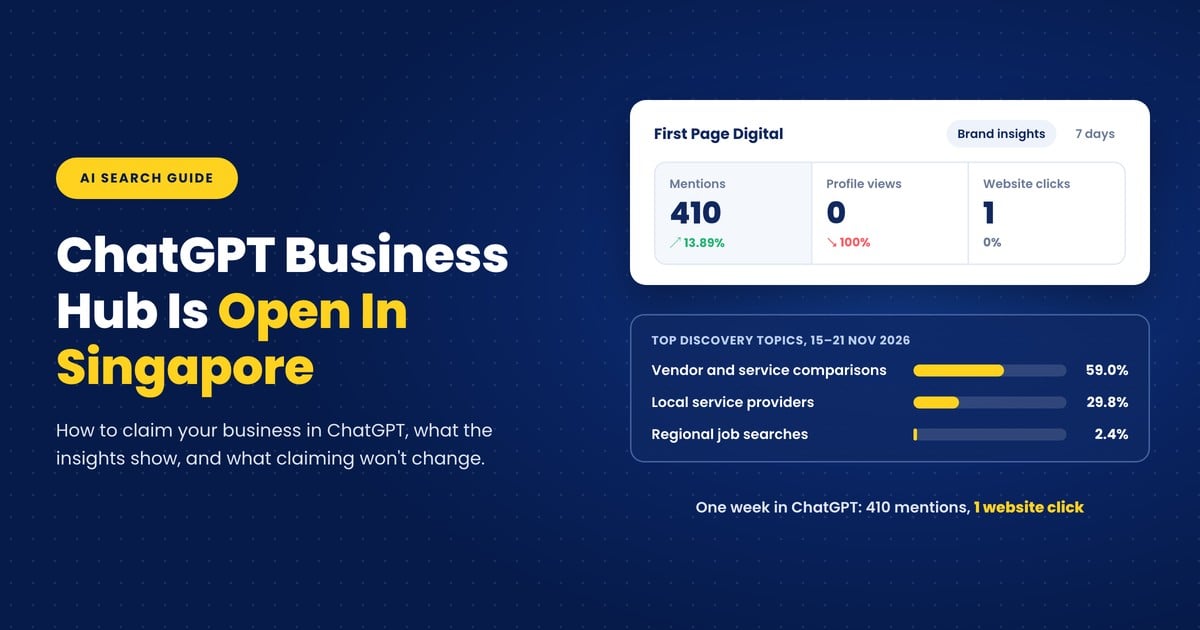
The Brand insights tab shows mentions, profile views, and website clicks for the last 7 or 28 days. In the week from 15 to 21 November 2026, ours counted 410 mentions, up 50 on the week before, along with 1 website click and no profile views.
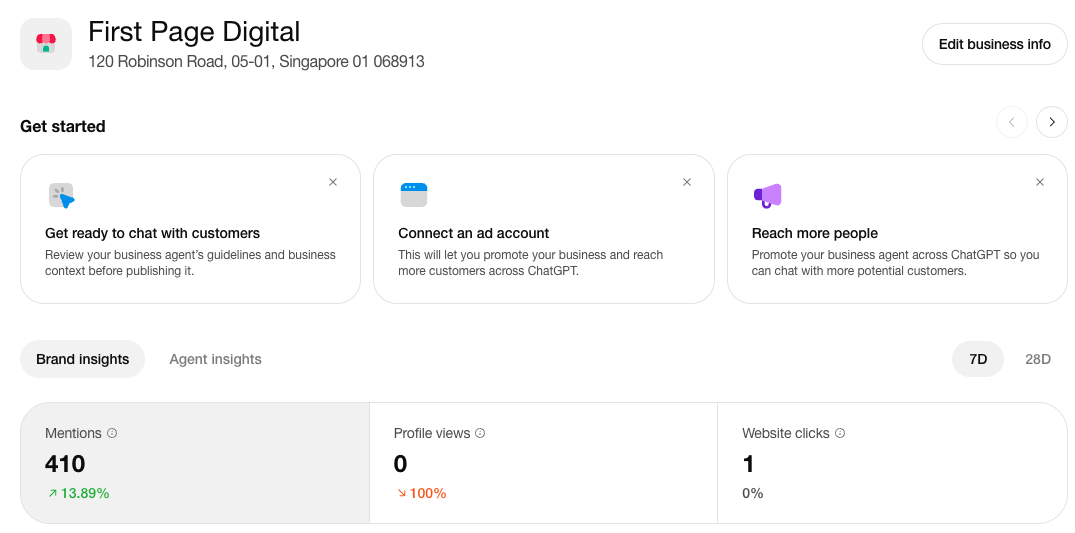
OpenAI counts a mention when a ChatGPT answer references a business’s website, or, for a local business, when it shows that location as a result, even if nobody opens it. So ChatGPT put First Page in front of people 410 times that week, and we got 1 click through to our site. I knew AI answers pass on few clicks, which is why I don’t judge AI visibility on referral traffic alone, but 1 in 410 was still lower than I’d have guessed.
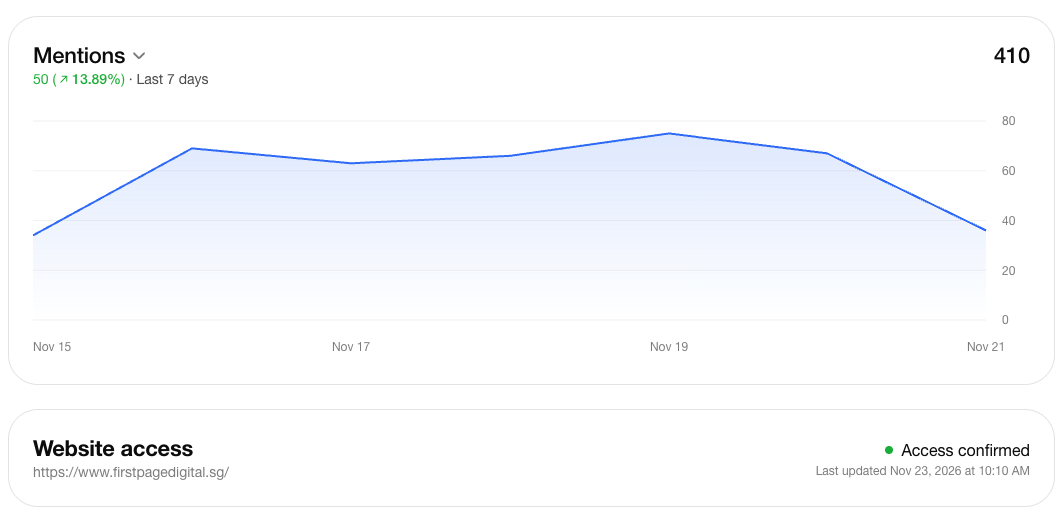
Mentions were lowest at the weekend, at about 35 on Sunday 15 November and again on Saturday 21 November, and ran between about 60 and 75 on every weekday in between. I’d put that down to people comparing agencies at work rather than at home.
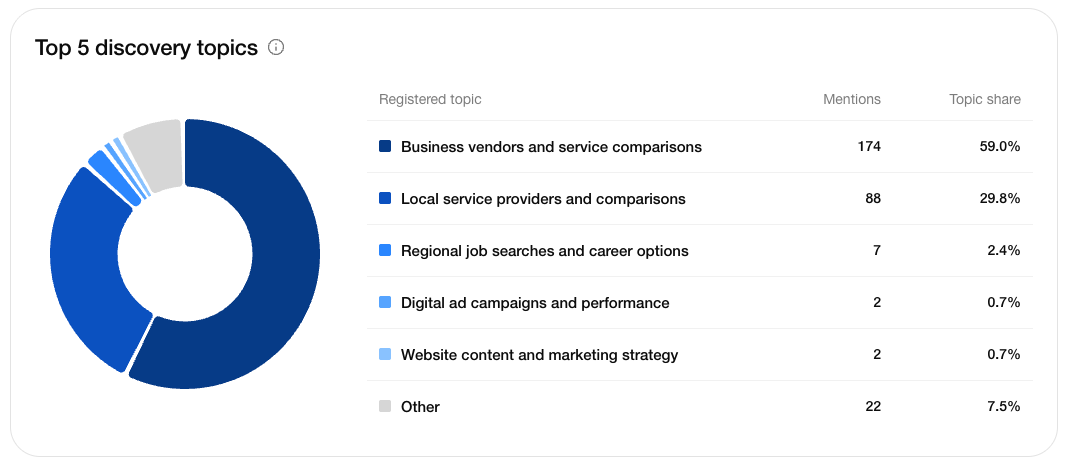
Most of the discovery topics, which group those conversations into themes, were about comparing providers. Business vendor and service comparisons made up 59% of the topic share and local service provider comparisons another 29.8%, which are exactly the conversations an agency wants to be in. The one that surprised me was 7 mentions from regional job searches, and I read those as people asking ChatGPT where to work rather than who to hire.
The dashboard also has a Website access panel, which reads “Access confirmed” for our site. OpenAI’s help page doesn’t explain it, but I take it to mean OpenAI can reach the website, so if yours doesn’t show it, I’d check whether your firewall or CDN is blocking OpenAI’s crawlers.
Why So Few People Click Through From ChatGPT
Part of the reason is what Business Hub counts as a mention. LLM Pulse, which sells AI visibility tracking, points out that for an online business, the count includes every answer that references your website, whether ChatGPT recommended you or just used one of your pages as a source. In one test it describes, an outdoor retailer’s site was linked four times in an answer about running socks, yet the retailer wasn’t one of the brands recommended.
I’d expect some of our 410 mentions to work the same way, because we publish a lot of guides that ChatGPT can draw on. Someone reading an answer that has already used our guide doesn’t have much reason to click through and read it again.
The bigger reason, I think, is that people would rather search for a brand later than click. Similarweb, which sells web traffic data and AI visibility tools, followed US desktop users from July to December 2025, and it found that people ChatGPT recommended a brand to were 2.5 times as likely to visit that brand’s site within the next seven days.
Most of those visits didn’t come from ChatGPT, though. Over half of them arrived through search, 55.9% against 40.4% of other visits, and only 8.8% came from a click in the AI, according to PPC Land’s coverage of the full report. So it looks like people read the recommendation and searched for the brand later, which means the visit shows up in your analytics as search or direct traffic, with nothing to say ChatGPT started it.
That’s how I read our single click. Hiring an agency is a considered decision, so I’d expect most people who found us in ChatGPT to look us up on Google and read our site before getting in touch, which fits how I think B2B buyers use AI, to form a view of who’s good at what long before they contact anyone.
Those reasons apply to every business, though, and our rate is still low next to the little there is to compare it with. OpenAI’s sample dashboard showed roughly one click for every three mentions, though that’s a demo, and the one live dashboard PPC Land reported had 24 clicks from 690 mentions over 28 days, or about 3.5%. One other dashboard isn’t much of a benchmark, but it does suggest our mix of mentions leans towards answers people don’t need to click.
Business Hub’s clicks also won’t match what GA4 shows. OpenAI told Digiday that clicks are clicks on links from ChatGPT rather than completed visits or purchases, as LLM Pulse reported, and LLM Pulse also noted that for a stretch in October 2026, many ChatGPT visits arrived with no referrer, so analytics filed them as direct traffic.
What Business Hub Won’t Do For You
Claiming doesn’t make ChatGPT recommend you more. OpenAI’s help page says claiming “doesn’t guarantee increased visibility” or give you direct control over ChatGPT’s independent recommendations, and that advertising doesn’t influence those answers either. Its terms add that claiming a listing doesn’t give you exclusive control over what it says. That matches my own view, which is that no one, including the platform itself, can promise a business a place in an AI answer.
Business Hub’s numbers also undercount, because for an online business, a brand name alone doesn’t count as a mention, so if ChatGPT names you without referencing your site, it isn’t recorded. OpenAI also hides metrics until they pass its thresholds, so a blank isn’t necessarily a zero, and the topics are themes rather than the prompts people typed. Semrush expects the count to run lower than the brand mentions that AI visibility tools report, and it suggests comparing it with citation data instead.
The terms also say that by using Business Hub, you agree OpenAI’s AI assistant may call your business on behalf of its users, which is easy to miss. There’s an opt-out link in the same clause, so read it before you start if you’d rather not take those calls.
What I’d Do Once Your Profile Is Approved
I’d start with the description, because it’s the one part of the profile written in your own words. Keep it factual and consistent with your website and Google Business Profile. Ours sticks to when we were founded, the services we offer, and two figures that are already on our website.
Next, I’d make sure OpenAI’s crawlers can reach your site, both in robots.txt and through any firewall or CDN, because a profile that links to a site ChatGPT can’t read won’t do much for you. After that, I’d go through the discovery topics each month and compare them with the pages you have, since a topic you show up for without a page to match is a gap you can fill.
Finally, compare Business Hub’s clicks with the ChatGPT visits in GA4, which usually show up as referrals from chatgpt.com, and watch searches for your brand name in Search Console, where Similarweb found most AI-influenced visits arrive. I’d also note the numbers down every week, since the dashboard only shows the last 7 or 28 days. And if you claimed from a ChatGPT workspace, add colleagues to it before inviting them to the profile, so you avoid the invite problem we hit.
Frequently Asked Questions
Is ChatGPT Business Hub free?
There’s no published fee for claiming a business or managing its profile, and OpenAI’s help page says you don’t need an Ads account or an Enterprise agreement. It doesn’t mention a ChatGPT plan either. We claimed ours from our paid ChatGPT Business workspace, and a colleague on a free account couldn’t be added, which fits OpenAI’s note that people invited to a profile claimed from a workspace may need to be members of it. Sponsoring a Business Agent through ChatGPT Ads costs extra, though agents are only open to US businesses for now.
Can Singapore businesses claim a profile in ChatGPT?
Yes. OpenAI opened Business Hub on 10 November 2026 to eligible businesses wherever ChatGPT is available, which includes Singapore, and First Page’s claim from Singapore was approved that month. Eligibility still depends on your industry, your location, and OpenAI’s verification checks. The part that isn’t available here yet is the Business Agent, the chat a business can publish inside ChatGPT, which is limited to eligible e-commerce and online service businesses in the US.
How long does ChatGPT Business Hub verification take?
Ours took most of a week. OpenAI doesn’t give a timeframe, saying only that review time varies, and it emails you its decision. Before you can edit the profile or see its insights, there’s also an identity check through Persona, and we had to provide both personal ID and business documents for it. Have your registration details ready, because the legal name, address, and registration number need to match your official records.
Will claiming my business make ChatGPT recommend it more?
No, not directly. OpenAI says claiming doesn’t guarantee more visibility or give you control over ChatGPT’s independent recommendations, and that advertising doesn’t influence its answers either. What claiming does give you is a say over the details on your profile, plus OpenAI’s own data on how often you’re mentioned, how many people click through, and the topics where you come up. Getting recommended more still comes down to what’s on your website and what other sites say about you.
What counts as a mention in ChatGPT Business Hub?
For an online business, a mention counts when a ChatGPT answer references the business’s website, so a brand name on its own doesn’t count. For a local business, it counts when ChatGPT shows that location as a result, even if the person doesn’t open the listing. That means Business Hub can undercount how often ChatGPT names you. Mentions also only appear once activity passes OpenAI’s thresholds, so a blank isn’t necessarily a zero.
Can an agency manage our Business Hub profile?
Yes. The admin who claimed the business can add teammates and give an agency access in Business Hub, and each person signs in with their own ChatGPT account. If the business was claimed from a ChatGPT workspace, OpenAI says the people you invite may need to be members of it, and I think that’s why our invite to a colleague on a free account didn’t work. So I’d have someone at your business claim it first, then check workspace access before inviting the agency.
References
- OpenAI, “Introducing Businesses in ChatGPT”, 10 November 2026
- OpenAI Help Center, “Setting up your business on ChatGPT”
- OpenAI, “Businesses in ChatGPT: Claim Your Business”
- OpenAI, “Businesses in ChatGPT Terms”, last updated 18 November 2026
- OpenAI, “ChatGPT Ads expands to Southeast Asia and Taiwan”, 23 September 2026
- PPC Land, “Businesses gain ChatGPT click and mention counts in OpenAI’s Business Hub”, 11 November 2026
- Similarweb, “Being Recommended in AI Makes Users 2.5x More Likely to Visit Your Site”, 23 June 2026
- Similarweb, “What Happens After AI Recommends Your Brand?”, 14 October 2026
- PPC Land, “Your analytics are lying: Similarweb traces AI recommendations to real traffic”
- LLM Pulse, “ChatGPT Business Hub doesn’t count your brand mentions. Here’s what it counts instead”, updated 23 November 2026
- Semrush, “ChatGPT Business Hub now shows mentions and clicks”, 17 November 2026
Information above was checked on 23 November 2026.